
Guide 13
Google profiles for businesses
Guide 13: the monthly service that keeps them showing up on maps
5 min read10 steps10 promptsfreeThe offer
When someone searches for a plumber or a dentist, Google shows three businesses in a box above everything else, and almost every call goes to those three. Which businesses land there depends partly on things nobody controls, like distance, and partly on things nobody at the business is doing, like posting updates, adding photos, answering the questions section, keeping services and hours right, and replying to reviews.
Most owners set their profile up once when they opened and never touched it again. The offer is that you run it every week for a monthly fee, and unlike most of this series it's a service the owner can see working without you explaining anything, because they watch their own listing fill up and their calls go up. Every step below comes with the exact prompt to paste in.
Step 1: Set up the agent
The install and the two agent options are on the agent setup pageUse a strong model, because this pipeline involves judgment calls and a weak model makes expensive mistakes with real mail.
After that, give it the keys for the job. In chat, tell the agent which accounts it's working with and paste the credentials when it asks: a Google Places API key from Google Cloud Console with the places API enabled and a budget cap on it, an OpenAI API key for the images with the ChatGPT image model, and a postcard API account with Lob, PostGrid, or Stannp. Once a client signs you'll also be added to their Google business profile as a manager. On Grok bot you can also log into a website once in the bot's browser and it stays logged in.
Step 2: Find the neglected profiles
The agent pulls your niche in a city through the places API and then looks at each profile the way a customer would. What you're looking for is a business with real reviews and a profile nobody maintains, so no recent posts, few photos or photos only from customers, unanswered questions, review replies missing, and services or hours that look out of date.
The ones worth mailing are rated 4.0 or above with enough reviews to show they're busy, because the profile work moves a business that's already good and does nothing for one with a two star average.
use my google places api key to pull every [niche] in [city]. for each business save name, address, phone, website, rating, review count, place id, hours, services listed, photo count, when the newest photos were posted, whether there are any questions in the q&a and whether they're answered, and how many of the last 10 reviews have owner replies.score each profile out of 10 on how neglected it looks, using: no posts, fewer than 10 photos, photos only from customers, unanswered questions, no review replies, missing services, missing hours.filter to rating 4.0 or higher with 20 or more reviews, sort by the neglect score, and show me the top 30 with the reasons.
Step 3: Compare them to the top three
The pitch is the same shape as the review guide, which is their profile next to the ones beating them. The agent pulls the three businesses Google currently shows in the box for that search in that area and saves what those profiles do that the prospect's doesn't, like posting weekly, having sixty photos, or replying to every review.
for [niche] in [city], find the 3 businesses google shows first for the main search terms customers use. for each, save review count, photo count, whether they post updates, whether they reply to reviews, and how complete their services and hours are. then for every business on my list, build a simple comparison: their numbers next to the top 3, and the three things the top 3 do that they don't.Step 4: The month of work, built before you sell it
The demo is a month of their profile already done. The agent writes four weekly posts for them using their real services and the season, drafts answers to any questions sitting unanswered, drafts replies to their last few reviews in the owner's voice, and rewrites their services and description with the words customers actually search for.
For photos, generate a few images that fit their trade with the ChatGPT image model, clearly marked as examples, because the real ones come from the owner's phone once they sign. What the owner is looking at is a month of work they've been meaning to do for two years, already finished.
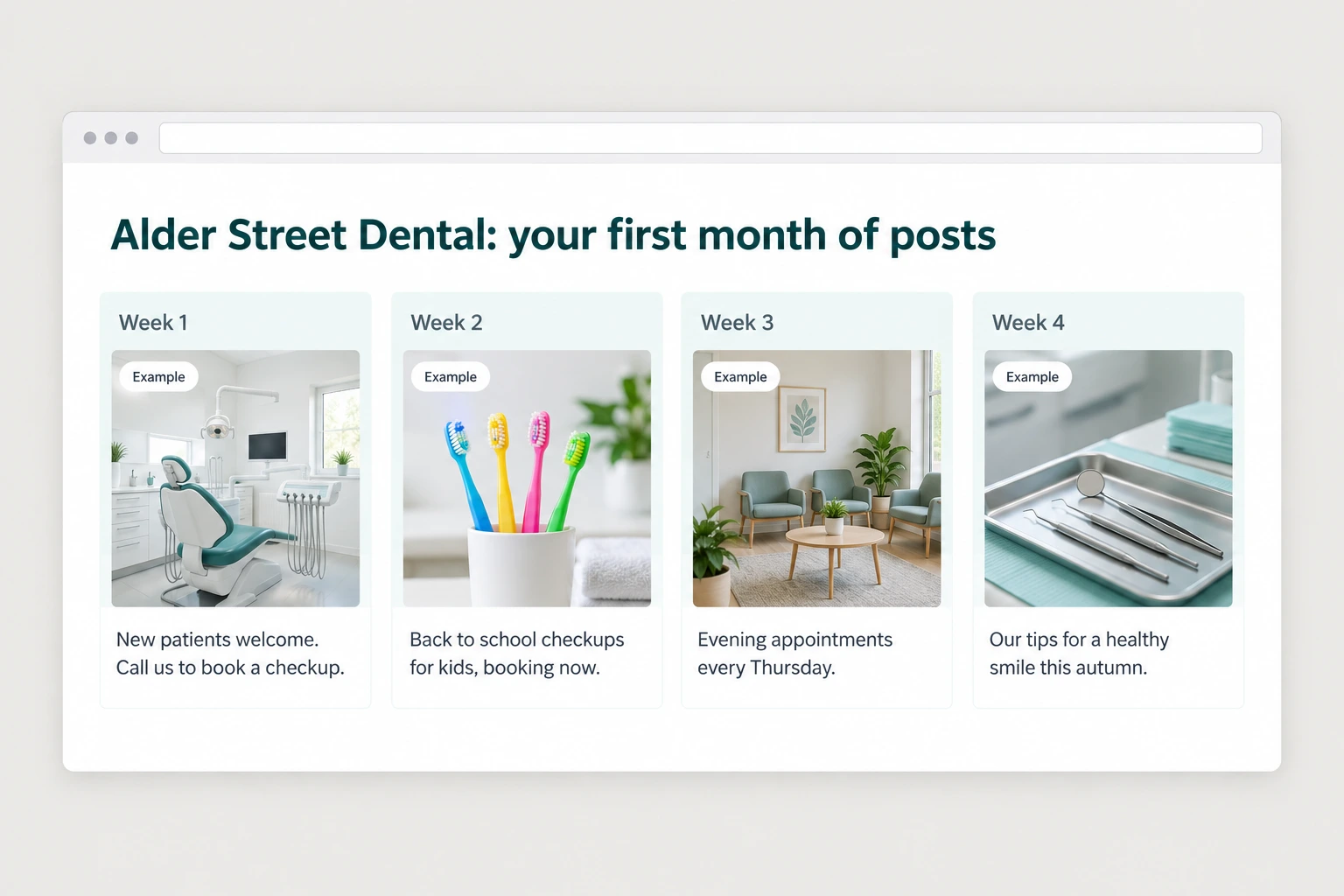
for each approved business, produce a month of profile work: 4 weekly posts using their real services and what's seasonal now, an answer for every unanswered question in their q&a, a reply in the owner's voice for each of their last 5 reviews including any negative ones, a rewritten services list and description using the terms customers search for, and 3 example photos generated with the chatgpt image model that fit their trade, marked clearly as examples. show me the first business's full month before doing the rest.Step 5: Build the demo page
The page shows their profile as it is now on one side and as it would look after a month on the other, with the comparison to the top three at the top and the month of posts, answers and replies underneath.
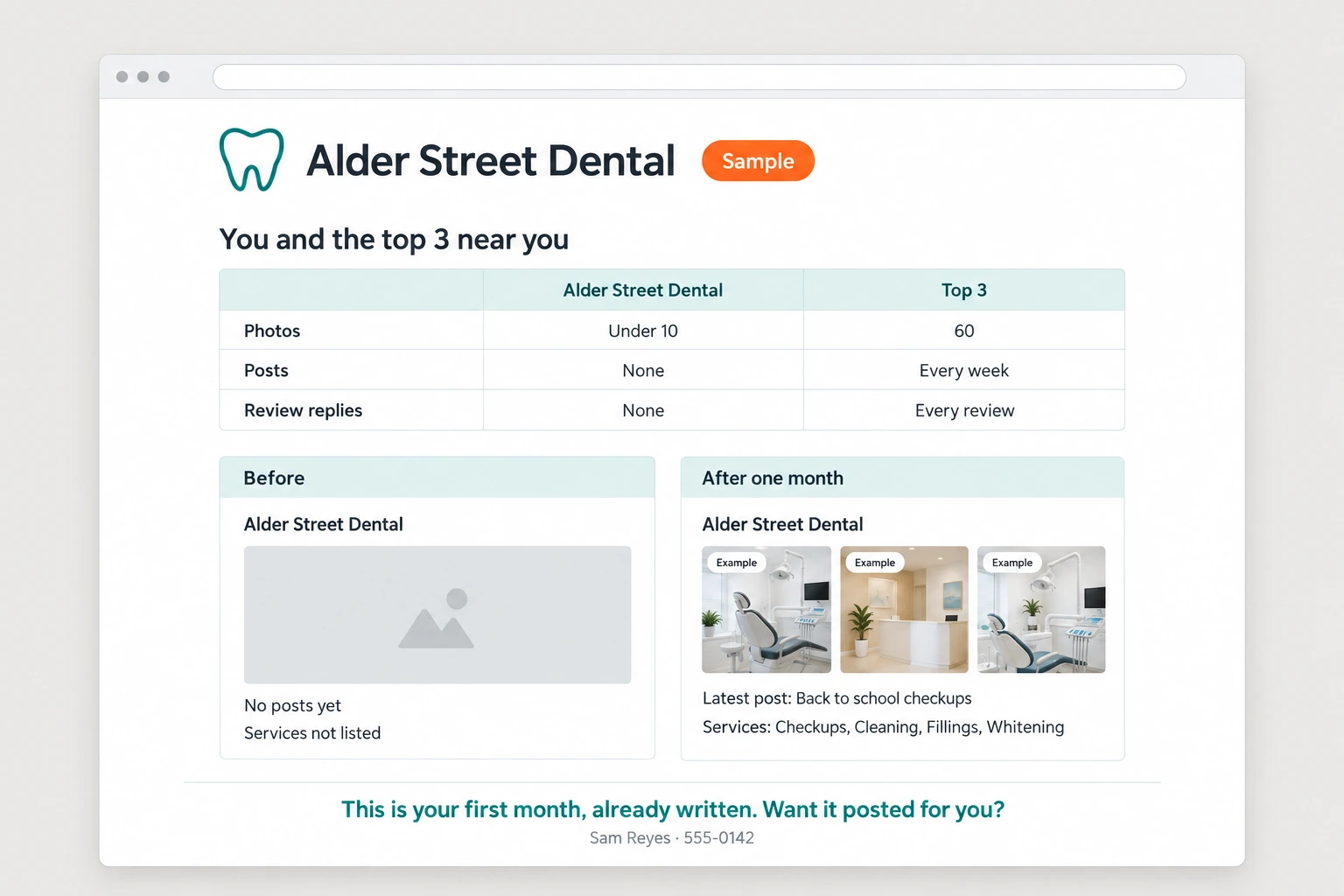
build a demo page per business: their name and logo at the top, then their numbers next to the top 3 in their area, then a before and after of their profile, then the 4 posts, the q&a answers, the review replies, and the rewritten services. mark the generated photos as examples. end with "this is your first month, already written. want it posted for you?" and my number: [your number]. host each on its own link.Step 6: The postcard
Postcard APIs like Lob, PostGrid, and Stannp mail real printed cards from an API call for a dollar or two each. The front is their comparison, meaning their photo count and post count next to the business Google shows first, and the back says "[business name] hasn't posted to Google since [date]. We wrote your next month. Scan to see it." With the QR and your phone number.
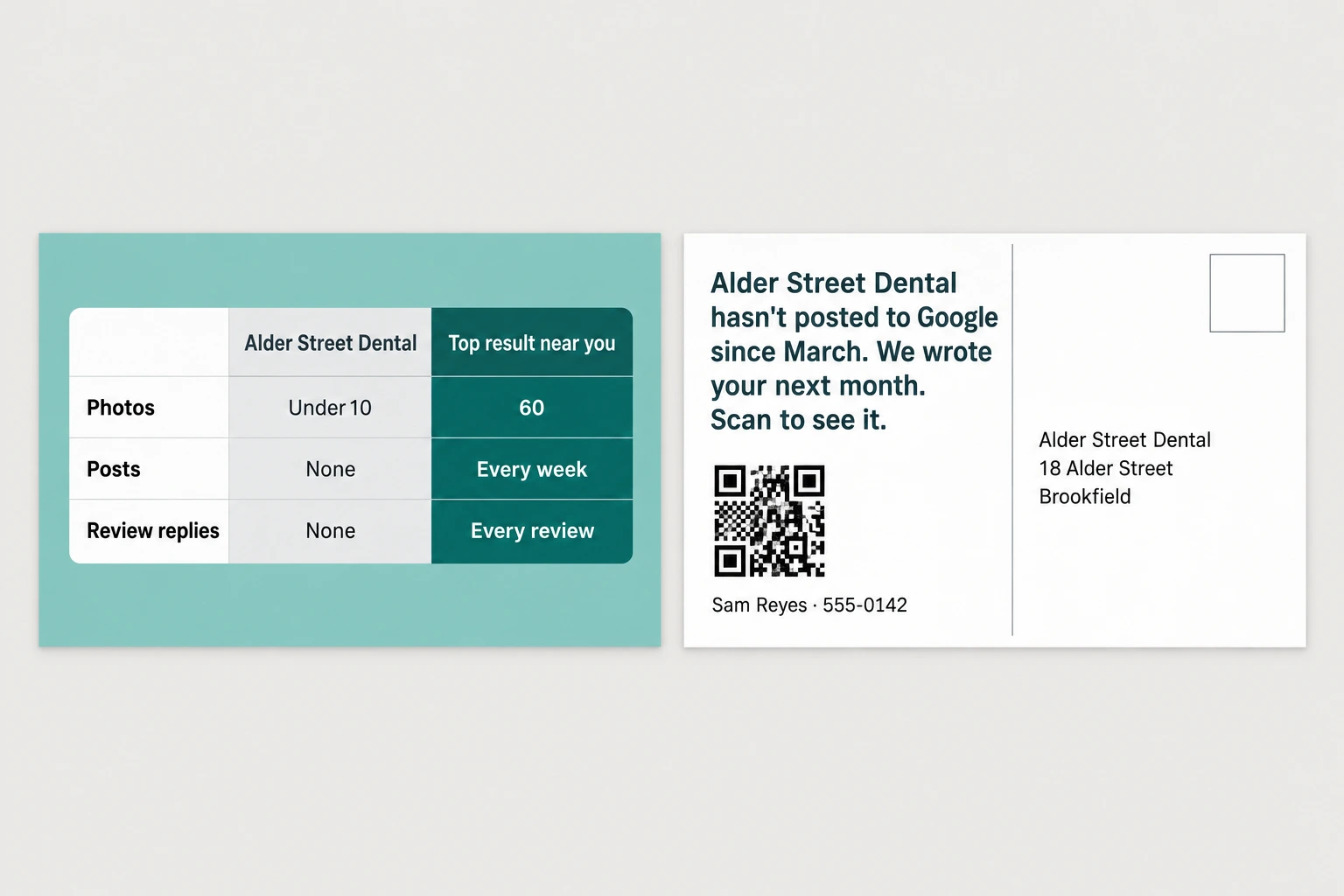
design a 6x9 postcard per business. front: a simple graphic comparing their photo count, post activity and review replies to the top business in their area. back: "[business name] hasn't posted to google since [date]. we wrote your next month. scan to see it." with a qr to their demo page and my name and number: [your name], [your number]. show me 3 samples, then send the batch after my approval and log every send.Step 7: Getting access
When an owner says yes, they add you to their profile as a manager, which takes a couple of minutes from their side and doesn't give you their Google account. Send them the steps as a short message with the email address to add, because this is the step where a non-technical owner gets stuck and goes quiet.
While you wait for access, publish nothing. Once you're in, the first week is the backlog, meaning the services, the description, the hours, the unanswered questions, and the review replies, and the owner sees all of it change in the first few days.
write the access instructions to send [owner name]: how to add [my email] as a manager on their google business profile, in plain steps with no jargon, short enough to read on a phone. once access is confirmed, publish the backlog in this order: services and description, hours, q&a answers, review replies, then the first post. show me everything before it goes live, and tell the owner what changed each day for the first week.Step 8: The weekly routine
After the first week this is a weekly schedule. The agent writes the week's post and sends it to you to approve, drafts replies to any new reviews, answers any new questions, adds the photos the owner sent that week, and checks that hours and services are still right, including holiday hours before a holiday.
The owner's only job is sending photos from jobs, so make that one thing easy by giving them a number to text them to, and the agent files them and uses them in posts.
put [business name] on a weekly schedule. every [monday], write that week's post using their services and what's seasonal, draft replies to any new reviews, answer any new questions, add any photos the owner texted to [number], and check hours and services are still correct including upcoming holidays. send me everything to approve before it publishes. if there's a new review under 4 stars, tell me the same day.Step 9: Showing it worked
This is a monthly fee, so the owner needs to see the number moving. The profile's own insights show how people found the business, how many called, how many asked for directions, and how many visited the site, and the agent pulls those every month and puts them next to the month before.
That same report is what makes the second and third client easy, because a real before and after from a business in the same trade is more convincing than any demo page.
at the start of every month, pull [business name]'s profile insights: searches, views, calls, direction requests, and website clicks, and put them next to the previous month and the month before they started. add what we published that month. send it to me first, then to the owner as a short summary with the numbers at the top.Step 10: Who else to sell it to
This is the natural second offer for every client you already have. Anyone who bought review cards, tap cards, or a website from the earlier guides has a profile sitting neglected, and you already have access to their business, their photos, and their reviews.
go through my client list from the other systems. for each one, score their google profile the same way we score prospects and tell me which of them would benefit most from profile management, with the three things missing from each. don't contact anyone, just give me the list.The full prompt
Once every step above works on its own, this is the whole pipeline in one message. Paste it in, fill in the brackets, and the agent saves it as one skill you can rerun on a new city with a single line.
you are my google profile management agent. run this pipeline and check in with me at the marked points.niche: [your niche] city: [your city]1. use my google places api key to pull every [niche] in [city] with their profile details: photos, posts, q&a, review replies, services, hours. score each one on how neglected the profile is. filter to rating 4.0 or higher with 20 or more reviews and sort by the score. show me the top 30 with reasons.2. for the same niche and city, save what the top 3 businesses google shows first do on their profiles, and build a comparison for each prospect.3. for each approved business, produce a month of work: 4 weekly posts, answers to unanswered questions, replies to their last 5 reviews in the owner's voice, a rewritten services list and description, and 3 example photos from the chatgpt image model marked as examples.4. build a demo page: their comparison to the top 3, a before and after of their profile, and the month of work, ending with "this is your first month, already written. want it posted for you?" and my number: [your number].5. design postcards: front is the comparison graphic, back says "[business name] hasn't posted to google since [date]. we wrote your next month. scan to see it." with a qr to the demo page.6. show me 3 demo pages and 3 postcards. after i approve, send the batch through my [lob / postgrid / stannp] account and log every send.7. when a client signs, send them the manager access instructions, publish the backlog after my approval, then run the weekly routine and send monthly insight reports.rules: never publish anything to a client's profile without my approval. never post a generated photo as if it were a real job photo. no mail without my batch approval. cap api spend at [$x] without asking. save this workflow as a skill.