
Guide 11
Instant quotes for trades
Guide 11: instant quotes for the new customers and a win-back for the old ones
6 min read10 steps9 promptsfreeThe offer
A trade business loses jobs in two places. Someone lands on their site at 9pm, sees a contact form, waits two days for a callback and books whoever answered first, and separately there's a list of hundreds of past customers who were happy with the work and have never heard from them since.
This guide fixes both and gets paid the same way for both, which is per booked job. The first pipeline puts an instant quote on their site so a visitor gets a real number in seconds, and the second goes through their old customer list and brings people back. One demo page shows both, one postcard sells both, and the owner judges it on the only number they care about, which is how full next week is. Every step below comes with the exact prompt to paste in.
Step 1: Set up the agent
The install and the two agent options are on the agent setup pageUse a strong model, because this pipeline involves judgment calls and a weak model makes expensive mistakes with real customers and real money.
After that, give it the keys for the job. In chat, tell the agent which accounts it's working with and paste the credentials when it asks: a Google Places API key from Google Cloud Console with the places API enabled and a budget cap on it, a postcard API account with Lob, PostGrid, or Stannp, a Vercel AI Gateway key for Jev, which the next step covers, and a Twilio number for the win-back messages. Once a client signs you'll also get their price list, their customer list, and access to put the quote widget on their site. On Grok bot you can also log into a website once in the bot's browser and it stays logged in.
Step 2: Connect Jev
Jev is a decision model from typesafe. The agent writes the messages, and Jev is the part that decides. You give it a situation, like one quote request with the customer's answers and the business's own price list, and a question with fixed answers, and it gives back one of those answers plus a probability for how sure it is. The agent only acts when Jev is sure and sends everything else to you, which is what makes it safe to let an agent near a business's customers and money.
You get Jev through Vercel AI Gateway. Make a Vercel account, open AI gateway, create an API key, and paste it into the agent. The model name is typesafe-ai/jev, and the agent calls it the same way it would call any other model. It costs almost nothing to run. In my testing, Jev decisions came to about $0.054 per 1,000, and a quote landed on screen in around 800ms.
Step 3: The price table
The agent never invents a price. The owner's own rates go into a table, and Jev's job is to decide which line of that table a request falls under and whether it can be quoted at all. That's what makes this safe to put in front of money, because the number on screen is the owner's number.
The table is simple, one row per job type with the base price, what changes it, and what the job can't cover:
drain clearing: $180 base, +$60 after 6pm, +$90 weekendswater heater swap, 40 gallon: $1,450 installedwater heater swap, 50 gallon: $1,700 installedleak repair: $220 first hour, $110 each hour afterrepipe: no instant quote, book a visitanything in a commercial building: no instant quote, book a visit
Jev answers four things per request: which job type this is, whether it can be quoted from the table, which modifiers apply, and whether anything in the request means a human should look first, like an emergency, a commercial address, or damage the customer describes. Above 0.8 it quotes, anything under that turns into a callback request with the details already collected, so the owner never loses the lead either way.
here is [business name]'s price table: [paste the table]turn it into questions for jev (model typesafe-ai/jev through my vercel ai gateway key). for each quote request jev answers: which job type, is it quotable from the table (yes/no), which modifiers apply, and does a human need to see it first (yes/no).rules: quote only above 0.8. never produce a price that isn't built from the table. anything else becomes "we'll call you back" with the answers saved. save this as a skill called "[niche] quote table".
Step 4: The quote widget
The widget sits on the business's own site and asks three or four questions in plain words, like what needs doing, how old the place is, and when they want it. Then it shows the price, a time window, and a button to book, and it sends the owner the booking with everything the customer answered.
Keep the questions short, because every extra question loses people. The customer's phone number comes last, after they've seen the price, so even the ones who don't book leave you a lead.
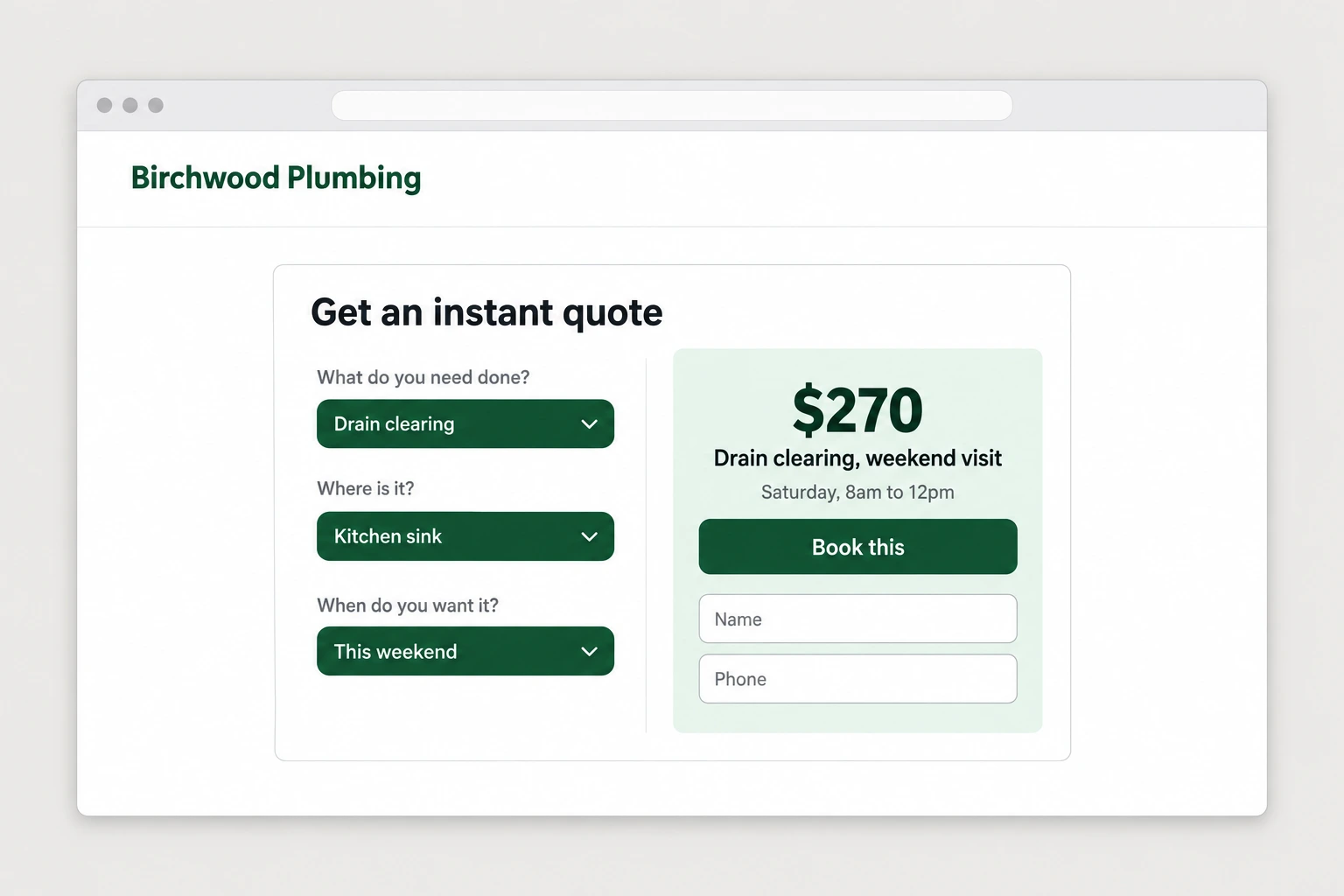
build a quote widget for [business name] that i can drop into their site with one script tag. it asks: what do you need done (list their job types), a couple of follow-up questions that decide the modifiers in their table, and when they want it. then it runs the answers through the "[niche] quote table" skill with jev and shows the price and a time window, with a "book this" button. ask for name and phone last. send every booking and every incomplete request to the owner by text and log it. match their site's colors and fonts.Step 5: The win-back list
The second pipeline uses a list the owner already has. Every invoicing or booking tool exports past customers with what they had done and when, and most trades have hundreds sitting there. The agent writes one message per person based on their last job, not a blast, so a customer who had a water heater put in four years ago hears about the flush it's due for, and someone whose ac was serviced last spring hears about this year's service before summer.
The rules matter more than the writing. One message per person, never someone who complained or had work go wrong, nothing to anyone who's been contacted in the last few months, and every message comes from the business with a way to book in one tap.
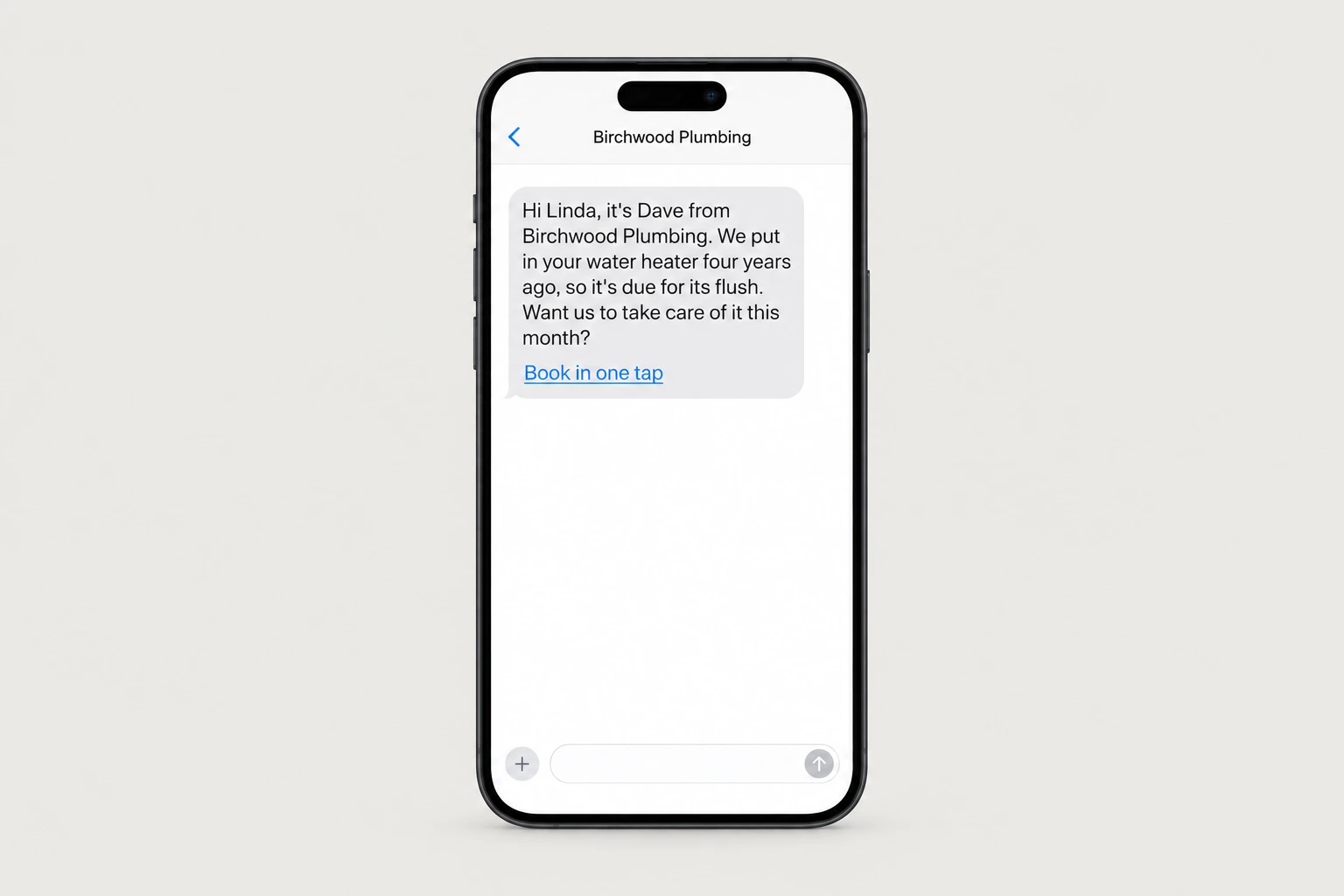
here is [business name]'s past customer list: [file]. for each person save name, phone, email, last job, date of last job, and amount.rules: skip anyone with a complaint, a refund, or an unresolved issue. skip anyone contacted in the last 90 days. skip anyone whose last job was under [$x]. sort the rest by what's most likely due now based on their last job and how long ago it was.write one message per person in [owner]'s voice, referencing their actual last job and what's due, with a booking link. show me the top 50 and the messages before anything is sent.
Step 6: Find the businesses
This fits trades where the job has a repeatable price and customers come back, so plumbers, HVAC, electricians, pest control, garage doors, cleaning companies and landscapers. Filter for a rating of 4.0 or above, at least 10 reviews, a phone listed, and a website, because the widget needs a site to sit on, and put the ones whose site only has a contact form at the top.
use my google places api key to pull every [plumber / hvac company / electrician / pest control company] in [city]. save name, address, phone, website, rating, review count, and their listed services. visit each website and note how a customer books: contact form only, phone only, or an online booking tool. filter to rating 4.0 or higher, 10 or more reviews, phone and website listed, and put contact-form-only sites first. wait for my approval.Step 7: Build the demo page
The demo has to show both halves, so the agent builds one page for each business with a working quote widget at the top loaded with prices it estimated from their listed services and their area, clearly marked as estimates for them to correct, and underneath it a sample win-back message written for their trade with a line saying how many past customers a business their size usually has sitting unworked.
The owner will play with the widget first, which is what you want, because the moment they type their own job in and see a number come back, the conversation stops being about whether this works.
for each approved business, build a demo page: their name and logo at the top, then a working quote widget using a price table you estimated from their listed services and local rates, marked clearly as "our estimates, you'd replace these with your real prices". underneath, show 3 sample win-back messages for their trade. end with "send us your price list and your past customer list and we'll set both up for free." and my number: [your number]. host each on its own link.Step 8: The postcard
Postcard APIs like Lob, PostGrid, and Stannp mail real printed cards from an API call for a dollar or two each. The front is a screenshot of the quote widget mid-quote with their business name on it, and the back says "we built [business name] an instant quote. Scan and price a job." With the QR and your phone number. The win-back half stays off the card, because one idea per card converts better and it becomes the thing you add on the call.
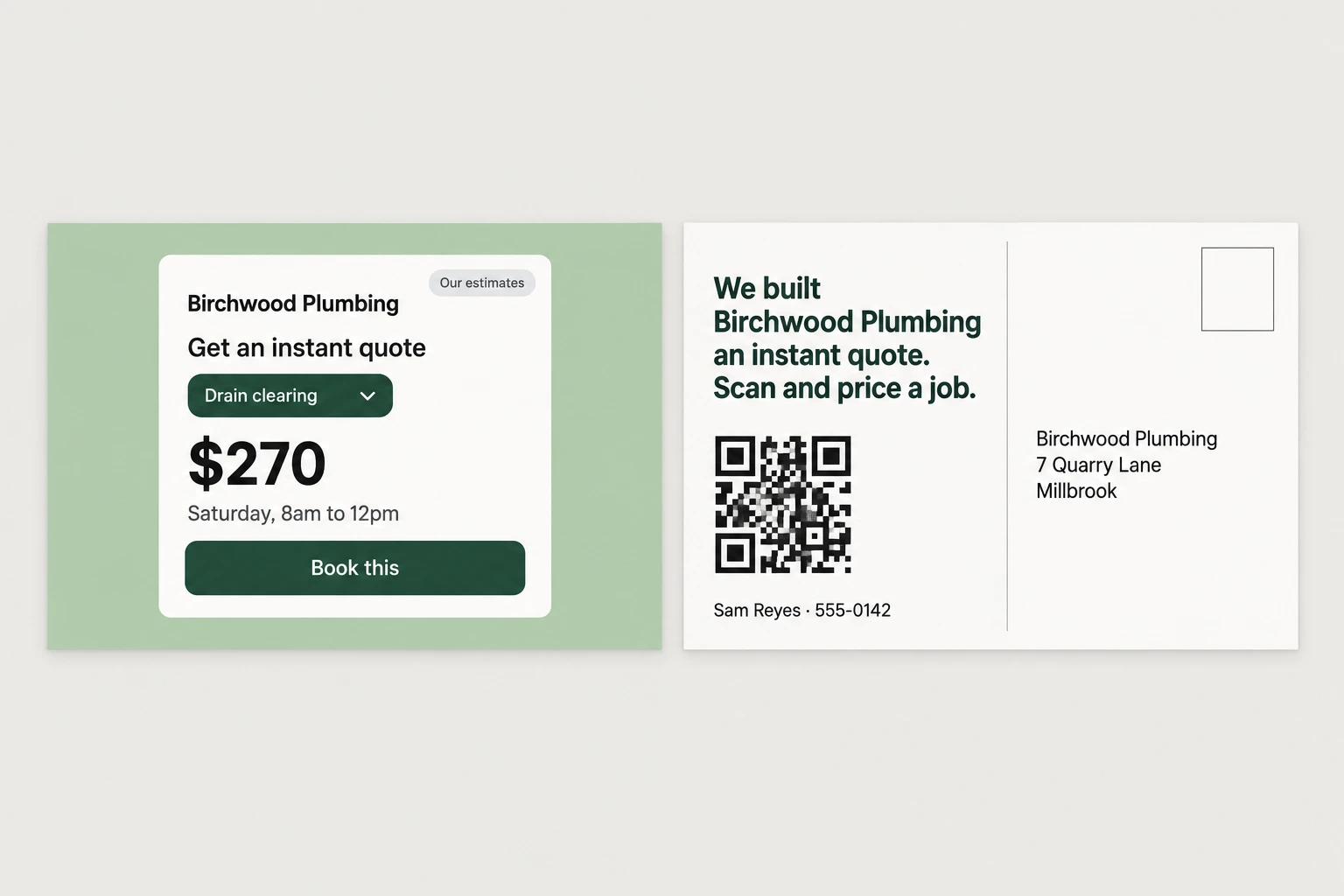
design a 6x9 postcard per business. front: a screenshot of their demo quote widget showing a price. back: "we built [business name] an instant quote. scan and price a job." with a qr to the demo page and my name and number: [your name], [your number]. show me 3 samples, then send the batch through my [lob / postgrid / stannp] account after my approval and log every send.Step 9: The free first job
What you ask for is their real price list and their customer export. The price list usually doesn't exist as a document, so the fastest route is a ten minute call where the owner says their prices out loud and the agent writes the table from the recording, then sends it back for them to correct.
Then you run the win-back on the first fifty names with every message shown to you before it goes, and you put the widget on their site. Bookings from both are counted the same way, and that first batch of bookings is what you get paid on and what makes the owner keep it running.
[business name] said yes. turn this recording of their prices into a price table: [file or notes]. send it back to the owner in plain language for them to correct. once they confirm it, load it into their quote table skill, install their widget on [their site], and run the win-back on the first 50 names from their list with every message shown to me first. track every booking from both, tagged by which one it came from.Step 10: Fulfillment
After the first batch this runs on a schedule. The win-back works through the rest of the list slowly, in small batches, and then keeps going on its own as customers age into being due again, so someone serviced last spring gets a message next spring. The widget keeps quoting, and anything Jev wasn't sure about lands in a list for the owner with a callback ready to go.
Once a month the agent sends the owner a simple count of bookings from the widget, bookings from the win-back, and the jobs that needed a callback, and that same count is what you invoice your per-booking fee from.
put [business name] on a schedule. every week, send the next batch of [x] win-back messages from their list, skipping anyone already contacted, and add customers to the queue as they become due based on their last job. keep the quote widget running and send the owner any request jev couldn't quote, with the customer's answers and their number. at the end of each month, send me and the owner a count of bookings from the widget, bookings from the win-back, and callbacks needed, with the total value of the booked work.The full prompt
Once every step above works on its own, this is the whole pipeline in one message. Paste it in, fill in the brackets, and the agent saves it as one skill you can rerun on a new city with a single line.
you are my booked jobs agent. run this pipeline and check in with me at the marked points.niche: [plumbers / hvac / electricians / pest control] city: [your city]1. use my google places api key to pull every [niche] in [city]. save name, address, phone, website, rating, review count, and services. note how each site takes bookings. filter to rating 4.0 or higher, 10 or more reviews, phone and website listed, contact-form-only sites first. wait for my approval.2. for each approved business, estimate a price table from their listed services, load it into a jev quote skill (model typesafe-ai/jev through my vercel ai gateway key), and build a demo page: a working quote widget marked as estimates, 3 sample win-back messages for their trade, and "send us your price list and your past customer list and we'll set both up for free."3. design postcards: front is a screenshot of the widget showing a price, back says "we built [business name] an instant quote. scan and price a job." with a qr and my number: [your number].4. show me 3 demo pages and 3 postcards. after i approve, send the batch through my [lob / postgrid / stannp] account and log every send.5. message me whenever a demo page is opened, with the business name and time on page.6. when a client signs: build their real price table from their own prices, confirm it with them, install the widget on their site, and run their customer list in batches with every message shown to me first.7. keep both running on a schedule and send a monthly count of bookings from each, with the value of the work booked.rules: never show a price that isn't built from the owner's table. one message per past customer, never anyone with a complaint. no mail or customer messages without my approval. cap api spend at [$x] without asking. save this workflow as a skill.