
Guide 10
Bill audits for businesses
Guide 10: find the overcharges on their bills and keep a share of the savings
6 min read11 steps9 promptsfreeThe offer
Every business pays the same few bills every month, like card processing fees, phone and internet, and waste collection, and almost nobody reads them line by line. The owner looks at the total, sees it's roughly what it was last month, and pays it. That's how the overcharges sit there for years, a fee that was never in the contract, a rate that went up with no notice, or a line for a service they cancelled a long time ago.
There are audit firms that go through these bills for businesses and keep a share of the savings they find, so the idea of paying someone out of what they save is already normal to owners. Most small businesses have just never had anyone offer.
The offer is that you audit their bills and take a share of what you save them, so it's free until it works. The agent reads the bills and writes the dispute letters, and a decision model called Jev checks every line against the rules so only real overcharges get flagged, which matters because a wrong flag in a letter to a provider makes the whole audit look bad. Every step below comes with the exact prompt to paste in.
Step 1: Set up the agent
The install and the two agent options are on the agent setup pageUse a strong model, because this pipeline involves judgment calls and a weak model makes expensive mistakes with real bills and real money.
After that, give it the keys for the job. In chat, tell the agent which accounts it's working with and paste the credentials when it asks: a Google Places API key from Google Cloud Console with the places API enabled and a budget cap on it, a postcard API account with Lob, PostGrid, or Stannp, and a Vercel AI Gateway key for Jev, which the next step covers. Once a client signs you'll also set up an email inbox where their bills get forwarded. On Grok bot you can also log into a website once in the bot's browser and it stays logged in.
Step 2: Connect Jev
Jev is a decision model from typesafe. The agent does the reading and the writing, and Jev is the part that decides. You give it a situation, like one bill with every line on it and the contract it should match, and ask it questions with fixed answers. It picks an answer and gives you a probability for how sure it is, from 0 to 1, and the agent only flags a line when Jev is sure.
You get Jev through Vercel AI Gateway. Make a Vercel account, open AI gateway from the dashboard, create an API key, and paste it into the agent when it asks. The model name is typesafe-ai/jev, and the agent calls it the same way it would call any other model. It costs almost nothing to run, when I tested all three of the results-based services in this series, 472 Jev decisions came to $0.0735 in total.
A Jev question for one line on a bill looks like this:
situation:monthly card processing statement for a restaurantcontract rate: 2.6% + $0.10 per transactionline: "pci non-compliance fee" $39.95this fee is not in the contract and was not on the last 6 statementsquestion: is this line an overcharge, and which type?answers: not an overcharge, fee not in contract, rate above contract, unused service, duplicate, increase without notice, minimum wrongly applied
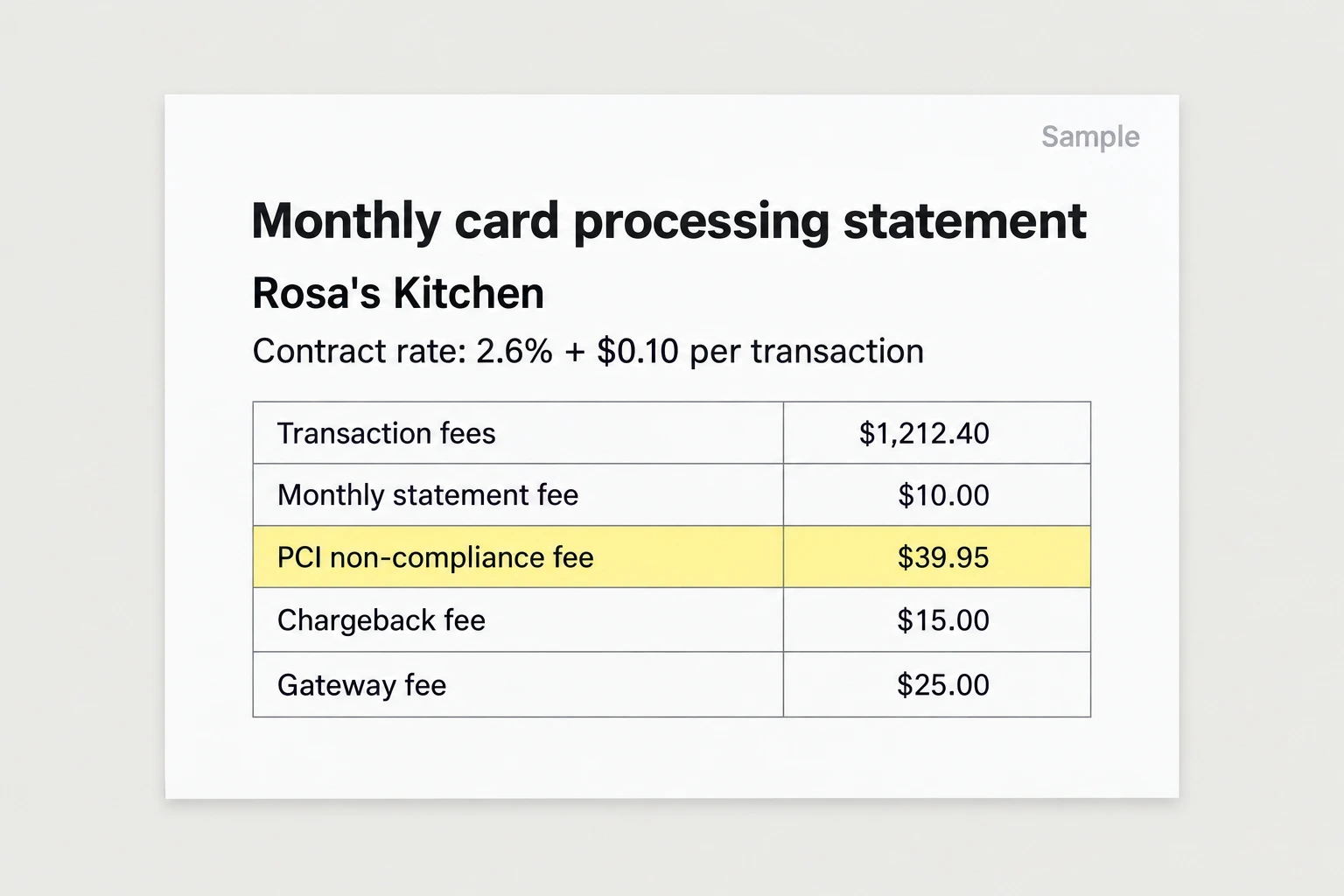
connect to jev through my vercel ai gateway key (model typesafe-ai/jev). make up a short card processing statement for a restaurant with 8 lines, where 2 lines are overcharges and 6 are correct, plus a contract rate of 2.6% + $0.10. ask jev about every line: is it an overcharge and which type. show me each answer and its probability, and tell me whether it caught the 2 i planted.Step 3: Write the rulebook
The rulebook is the list of overcharge types, each with what the line gets compared against. This is the one I used:
a fee that isn't in the contracta rate above the contracted ratea charge for a service no longer usedthe same fee charged twicea rate increase with no written noticea minimum charge applied when volume was above the minimumcompare every line against the contract, the last few bills, and the provider's published fee table
One Jev call covers a whole bill. For every line it answers whether it's an overcharge and which type, and for the bill as a whole whether it's worth disputing and roughly how much it saves. A line only gets flagged when Jev is more than 0.8 sure, anything under that goes to your review list, and the agent adds the flagged lines into a monthly and a yearly number.
Comparing against the published fee table is what keeps the flags honest. In my test there was a $170.08 fuel surcharge that looked high but matched the waste company's published table, and Jev left it alone, and an environmental fee that looked wrong wasn't wrong either. So ask each client for their contracts early, and have the agent find the provider's published fee pages.
here is my rulebook for bill audits, written in plain words: [paste your rulebook]turn it into questions for jev (model typesafe-ai/jev through my vercel ai gateway key). use one jev call per bill. for each line jev answers: is it an overcharge (yes/no) and which type. for the whole bill: worth disputing (yes/no) and the savings range.decision rules: flag a line only above 0.8. anything under goes to my review list. add up flagged lines into a monthly and yearly total.save it as a skill called "bill audit rulebook".
Step 4: Write the dispute letter
When a bill has flagged lines, the agent writes the letter to the provider. It's plain and specific: the account number, the bill date, each flagged line with the amount, what the contract says instead, and what you're asking for, which is a credit for the past charges and the line removed going forward. The letter goes out in the business's name, signed by the owner, and the agent keeps a copy with the bill.
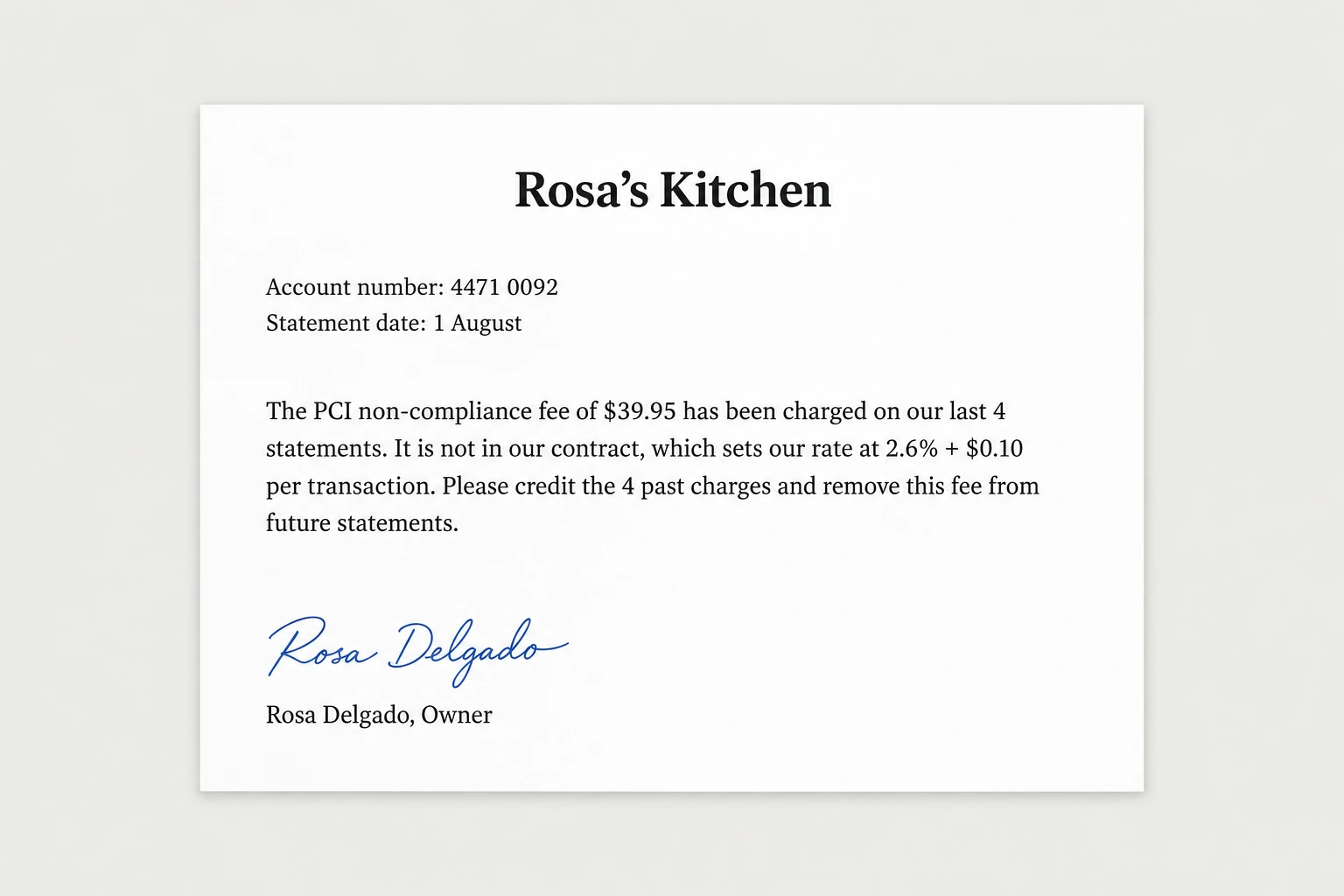
for every bill with flagged lines, write a dispute letter to [provider] from [business name], signed by [owner name]. include the account number, the bill date, and for each flagged line: the line name, the amount, how many months it's been charged, and what the contract or fee table says instead. ask for a credit for all past overcharges and for the line to be removed or corrected going forward. keep it short and polite. show me the letter before it's sent.Step 5: Find the businesses
Any business with trucks, a storefront, or a lot of card payments has these bills, so HVAC companies, plumbers, restaurants, auto shops, and retail stores all work. Restaurants and retail are good for card processing audits because they run a lot of card payments, and trades with trucks and yards are good for waste and fuel surcharges. Filter for a rating of 4.0 or above, at least 10 reviews, and a phone and website listed.
use my google places api key to pull every [hvac company / plumber / restaurant / auto shop / retail store] in [city]. save name, address, phone, website, rating, and review count. filter to rating 4.0 or higher, 10 or more reviews, and a phone and website listed. put it in a google sheet called "[niche] [city] audits" and wait for my approval.Step 6: Build the demo page
You don't have their real bills yet, so the agent makes one mock bill for their trade, like a card processing statement for a restaurant or a waste bill for an HVAC company, with a few overcharges planted in it. It runs the bill through Jev and builds a page showing every line with the flagged ones marked, what type of overcharge each one is, and the monthly and yearly total at the bottom.
Put their name and logo at the top, mark it clearly as mock data, and end with one line: send us one bill and we'll audit it for real, free.
for [business name], make 1 realistic mock [card processing statement / waste bill / phone and internet bill] for a [trade] business, with 10 to 15 lines and 3 overcharges planted in it of different types. run it through my bill audit rulebook skill with jev. build a demo page: their name and logo from [website] at the top, every line of the bill with flagged lines highlighted and their overcharge type, the monthly and yearly total recoverable at the bottom, and the first paragraph of the dispute letter. mark it clearly as mock data, end with "send us one bill and we'll audit it for real, free." and my number: [your number]. host it on its own link.Step 7: The postcard
Postcard APIs like Lob, PostGrid, and Stannp mail real printed cards from an API call for a dollar or two each. The front is a screenshot of the demo page with the yearly number showing, and the back says "we found the overcharges on a bill like [business name]'s. Scan to see them." With the QR to the demo page and your phone number.
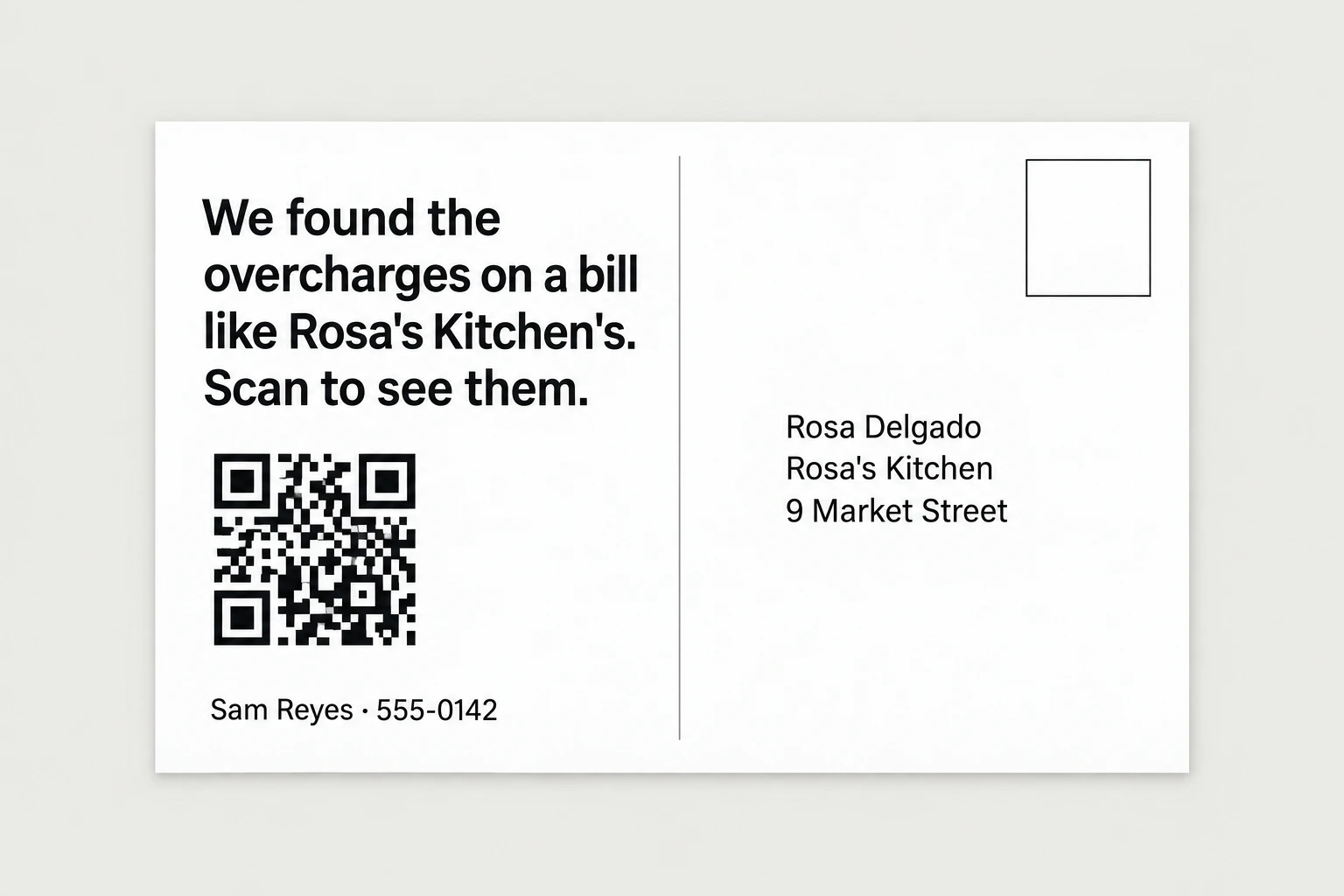
design a 6x9 postcard per business. front: a screenshot of their demo page with the flagged lines and the yearly total showing. back: "we found the overcharges on a bill like [business name]'s. scan to see them." with a qr to the demo page and my name and number: [your name], [your number]. show me 3 samples. after i approve, send the batch through my [lob / postgrid / stannp] account and log every send.Step 8: When they scan
The agent watches the demo links and messages you when one is opened. An owner who looked at the flagged lines is usually already thinking about their own bill, so call them that day and ask which bill they'd want checked first. The answer to how you get paid is a share of what you save them, and nothing if you find nothing.
message me whenever a bill audit demo page is opened, with the business name, their phone, and time on page. for businesses that opened it but didn't call after 3 days, draft one short follow up text from me for my approval. only one follow up per business.Step 9: The free first job
When an owner sends a real bill, which is usually a pdf from the provider's portal, the agent reads it, asks for the contract if it doesn't have one, finds the provider's published fee table, runs it through Jev, and shows you the flagged lines and the drafted letter. Ask for the last three months of the same bill if they can get it, because it shows when a fee first appeared and how long it's been charged.
When I tested this on 20 bills for an HVAC company, 274 lines in total, run twice, Jev got 273 of 274 lines right, didn't flag a single correct line, and found $1,837.33 a month that could be recovered, which is $22,047.96 a year, the same to the cent on both runs. The one it missed was a $5.95 duplicate that Jev named correctly but only at 0.60, so it went to the review list instead of being flagged.
Step 10: Fulfillment
Once a business signs, give them an email address to forward their bills to, or connect the inbox the bills already land in. The agent reads each new bill when it arrives, pulls the contract terms you saved for that provider, asks Jev, and puts the flagged lines and a drafted dispute letter in front of you. After you approve, the letter goes to the provider, and the agent tracks every credit and refund that comes back.
At the end of each month the agent sends you and the owner a statement listing every overcharge found, what the provider credited back, and what's still open, and you bill your share from that.
[business name] signed. every time a bill arrives at [audit inbox] from them, read it, match it to the saved contract and fee table for that provider, run it through their copy of my bill audit rulebook with jev, and draft a dispute letter for any flagged lines. show me everything before a letter goes out. track every credit or refund that comes back on later bills, and at the end of each month send me and the owner a statement of overcharges found, credits received, and what's still open.Step 11: Adding more clients
Every new client is the same skill with their own contracts saved, so one agent runs all of them from one inbox. It also stacks with guides 8 and 9, because a business that's letting overcharges sit on their bills usually has unpaid invoices and lost disputes too, and all three get paid out of money the owner didn't know they had.
The full prompt
Once every step above works on its own, this is the whole pipeline in one message. Paste it in, fill in the brackets, and the agent saves it as one skill you can rerun on a new city with a single line.
you are my bill audit agent. run this pipeline and check in with me at the marked points.niche: [hvac / plumbers / restaurants / auto shops / retail] city: [your city]1. use my google places api key to pull every [niche] in [city]. save name, address, phone, website, rating, and review count.2. filter to: rating 4.0 or higher, 10 or more reviews, phone and website listed. show me the list and wait for my approval.3. for each approved business, make 1 mock bill for their trade with a few overcharges planted in it, run it through my bill audit rulebook skill with jev (model typesafe-ai/jev through my vercel ai gateway key), and build a demo page: their name and logo, every line on the bill with the flagged ones marked and their overcharge type, the yearly total at the bottom, marked clearly as mock data, ending with "send us one bill and we'll audit it for real, free."4. design postcards: front is a screenshot of the demo page with the yearly total showing, back says "we found the overcharges on a bill like [business name]'s. scan to see them." plus a qr to the demo page and my number: [your number].5. show me 3 sample demo pages and 3 sample postcards. after i approve, send the batch through my [lob / postgrid / stannp] account and log every send in a spreadsheet.6. message me whenever a demo page is opened.7. when a client forwards a real bill to [your audit inbox], read it, match it to the contract i saved for that provider, run jev, and draft a dispute letter for the flagged lines. show me everything before a letter goes out, track every credit or refund that comes back, and send a monthly statement.rules: never send a dispute letter without my approval. never flag a line that matches the contract or the published fee table. no mail without my batch approval. cap api spend at [$x] without asking. save this workflow as a skill.