
Guide 08
Invoice chasing for trades
Guide 8: get paid a cut of every overdue invoice you bring in
11 min read11 steps4 promptsfreeThe offer
Almost every local business that bills after the job, like plumbers, HVAC companies, electricians, roofers, and contractors, has a pile of unpaid invoices sitting in QuickBooks or whatever they use. Some are a week late, some are two months late, and the owner knows exactly how much is out there because they look at it every time they check the account. They just don't chase it, because chasing people for money is awkward, they're on jobs all day, and by the time they get to it the customer has forgotten what the invoice was even for.
What usually happens is the owner sends one reminder, maybe two, and then either writes the money off or hands the old invoices to a collections firm that keeps a cut of whatever it gets back. So the owner is already used to the idea of paying someone a share to get their money in, they're just paying a firm that shows up too late, after the customer has stopped answering.
The offer is that you chase those invoices for them from day seven, in their name, and take a cut of what comes in, so if nothing comes in they owe you nothing. The agent works out which message each invoice needs today, writes it, and sends it, and a decision model called Jev checks every single invoice before anything goes out, so a customer who already paid, who disputed the bill, or who promised to pay on friday never gets a reminder they shouldn't. That check is the part the owner cares about most, because the one thing they're scared of is an agent annoying a good customer.
Step 1: Set up the agent
The install and the two agent options are on the agent setup pageUse a strong model, because this pipeline involves judgment calls and a weak model makes expensive mistakes with real customers and real money.
After that, give it the keys for the job. In chat, tell the agent which accounts it's working with and paste the credentials when it asks: a Google Places API key from Google Cloud Console with the places API enabled and a budget cap on it, a postcard API account with Lob, PostGrid, or Stannp, and a Vercel AI Gateway key for Jev, which the next step covers. Once a client signs you'll also connect their invoicing tool and the email address their reminders go out from. On Grok bot you can also log into a website once in the bot's browser and it stays logged in.
Step 2: Connect Jev
Jev is a decision model from typesafe. The agent does the writing and the sending, and Jev is the part that decides. You give it a situation, like one overdue invoice with its amount, its dates, and every message that's gone back and forth, and you ask it a question with a fixed set of answers. It picks one of those answers and gives you a probability for how sure it is, from 0 to 1. the agent only acts when Jev is sure and sends everything else to you, so the agent never has to guess on its own.
You get Jev through Vercel AI Gateway. Make a Vercel account, open AI gateway from the dashboard, create an API key, and paste it into the agent when it asks. The model name is typesafe-ai/jev, and the agent calls it the same way it would call any other model, so you don't have to write any code yourself. It costs almost nothing to run, when I tested all three of the results-based services in this series, 472 Jev decisions came to $0.0735 in total.
A Jev question looks like this. The agent builds one of these for every invoice, fills in the facts, and sends it:
situation:invoice #1042, $680, sent 23 days ago to dana r.reminder 1 sent 16 days ago, no replyno payment recordedquestion: which action should go out today?answers: reminder 1, reminder 2, firm notice, call, stop
Jev comes back with something like reminder 2 at 0.93, and because that's above the line you set, the agent writes reminder 2 and sends it. If it came back with reminder 2 at 0.61, the invoice would land on your review list instead. Before you build anything else, have the agent run three made-up invoices through Jev like this and show you the answers, so you know the connection works.
connect to jev through my vercel ai gateway key (model typesafe-ai/jev). make up 3 overdue invoices: one 10 days late with no reminders sent, one 25 days late with one reminder sent, and one 30 days late where the customer replied "i'll pay friday". ask jev which action should go out today for each one, with the answers reminder 1, reminder 2, firm notice, call, stop. show me each answer and its probability.Step 3: Write the rulebook
The rulebook is a plain written list of what correct looks like for chasing invoices. You write it in normal words, and the agent turns it into questions for jev. This is the one I used:
reminder 1 at 7 days overduereminder 2 at 21 daysfirm notice at 45 daysphone call at 60 daysstop if the customer disputed the invoicestop if the customer promised a payment date that hasn't passed yetstop if the customer is on a payment planstop if the amount is under $50never chase an invoice that's already paidnever contact the same customer twice in 7 daysif the customer asked a question about the invoice, answer it first
The timing lines decide which message goes out and when. The stop lines are the ones that protect the owner, because each one is a situation where sending a reminder would make things worse, like a customer who's arguing about the bill or who already told you when they'll pay. The never lines are the hard limits that don't change for any client.
For every invoice Jev answers five questions. Which action goes out today, out of reminder 1, reminder 2, firm notice, call, or stop. Did the customer dispute it. Is a promised payment still pending. Is it already paid. And what tone should the message take, friendly, firm, or neutral. A stop that Jev is more than 0.8 sure about always wins, any other action only runs when Jev is more than 0.8 sure, and anything under that comes to you to check. So if Jev thinks an invoice might be paid, even at 0.5, the agent holds it and asks you.
The last line in that rulebook came from a mistake in my own test. A customer had replied "what's this one for again?" And Jev stopped the invoice at 0.82, so nothing went out and the customer never got an answer, which meant the invoice would have sat there unpaid forever. The fix was one new line saying answer the question first, and every mistake you find gets added the same way. After a few clients your rulebook covers cases you'd never have thought of when you started, and that list is the thing someone copying your setup doesn't have.
You'll adjust the rulebook a little per client. A roofer with big invoices might want the call at 30 days instead of 60, and an owner who doesn't want any phone calls at all just gets that line removed. Keep your base rulebook saved, and let the agent make a copy per client with their changes.
here is my rulebook for chasing overdue invoices, written in plain words: [paste your rulebook]turn it into questions for jev (model typesafe-ai/jev through my vercel ai gateway key). for each invoice, jev should answer: which action goes out today (reminder 1, reminder 2, firm notice, call, stop), did the customer dispute it (yes/no), is a promised payment still pending (yes/no), is it already paid (yes/no), and what tone to use (friendly, firm, neutral).decision rules: a stop above 0.8 always wins. any other action runs only above 0.8. everything else goes to my review list with jev's answers next to it.save the rulebook and the questions as a skill called "invoice rulebook" so i can make a copy per client.
Step 4: Write the messages
Jev picks the action, and then the agent writes the message for it. You want four messages, one for each action, written in the owner's voice and not yours, because the customer should feel like they're hearing from the business they hired. Every message includes the invoice number, the amount, the date of the job, what the job was, and a link to pay, since most people who don't pay just need the invoice in front of them again with a way to pay in one tap.
Reminder 1 is friendly and short, basically a heads up that the invoice is still open. Reminder 2 is still polite but mentions it's the second reminder. The firm notice is clear that the invoice is well overdue and asks the customer to pay or reply by a date. The call is a short script the owner or you can read from, or it becomes a voicemail if you're using a voice agent from guide 4. here's what reminder 1 looked like in my test:
hi dana, just a quick note from [business name] that invoice #1042 for $680 (water heater replacement on the 3rd) is still open. you can pay it here: [pay link]. if you've already sent it, ignore this and thanks. [owner name]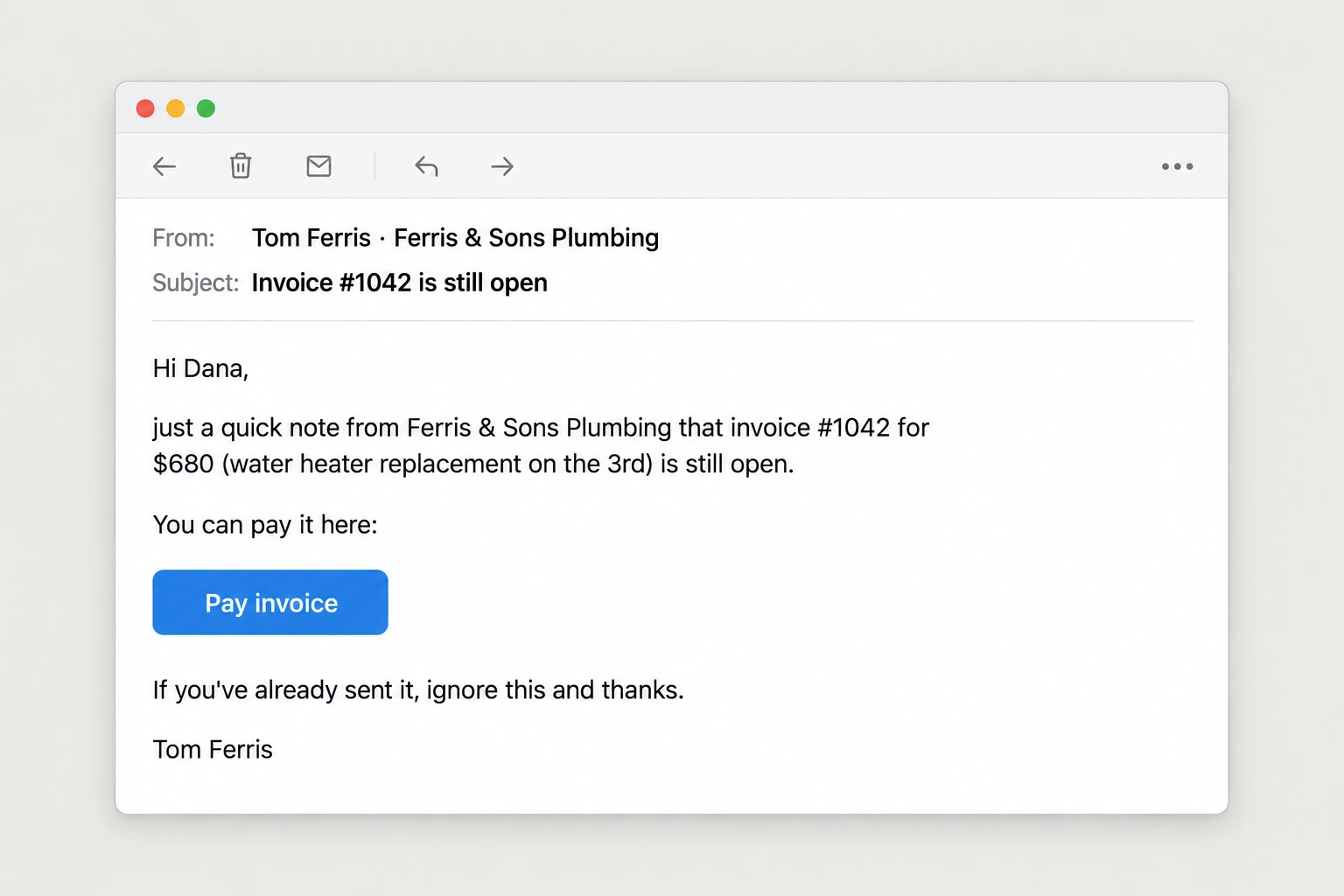
If a customer replies to any of these, the reply goes back into the invoice's history, so the next time Jev looks at it, it knows about the reply. That's how a customer saying "i'll pay on the 15th" automatically stops the reminders until the 15th has passed.
Step 5: Find the businesses
The agent pulls every business in your niche in a city through the places api. Pick trades that bill after the job is done, like plumbers, HVAC, electricians, roofers, landscapers, and cleaning companies, because those are the ones with invoices going unpaid. Trades where the customer pays on the spot, like barbers or cafes, don't have this problem.
Filter for a rating of 4.0 or above, at least 10 reviews, and a phone and website listed. The reviews tell you it's a working business with real customers, and the website matters here because the demo page uses their real name and logo, which the agent pulls from their site. Start with one trade in one city so the mock invoices on every demo page look right for that trade, then move to the next.
Step 6: Build the demo page
You don't have their real invoices yet, so the agent makes ten mock invoices in the business's name, between 15 and 60 days overdue, with the kind of jobs and amounts that trade would actually have. For a plumber that's water heaters, drain clearing, and leak repairs, and for an HVAC company it's ac repairs and furnace installs. Mix in a couple of tricky ones, like a customer who replied promising to pay next week and one who's disputing the bill, because those are the ones that show Jev doing its job.
The agent runs all ten through Jev and builds one page. At the top is their business name and logo. Under that is every invoice in a list with the customer, the amount, the days overdue, Jev's decision, and how sure Jev is. For the top three it shows the actual message that would go out today, and the invoices Jev stopped are marked with the reason, like "customer promised payment on the 15th". At the bottom is the total sitting unpaid across all ten. Mark the page clearly as mock data, and end it with one line: send us your 20 oldest unpaid invoices and we'll run them for real, free.
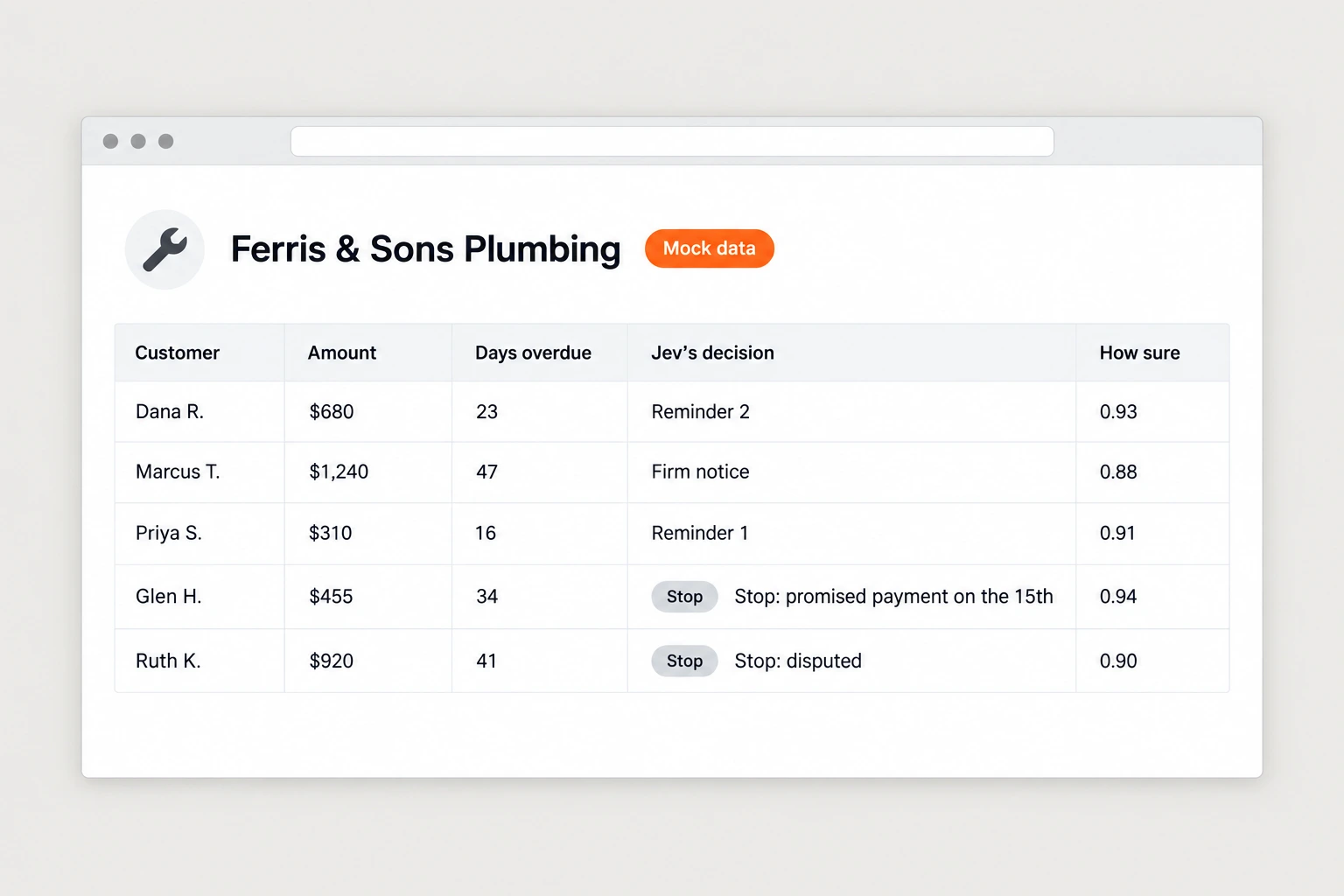
for [business name], make 10 mock overdue invoices that fit a [trade] business: realistic jobs and amounts, between 15 and 60 days overdue. include one customer who replied promising to pay on a date that hasn't passed, one who disputed the bill, and one who asked a question about the invoice.run all 10 through the invoice rulebook skill with jev. then build a demo page: their name and logo from [website] at the top, then each invoice with customer, amount, days overdue, jev's decision and probability. show the message that would go out today for the top 3. for stopped invoices, show the reason. put the total unpaid at the bottom. mark the page clearly as mock data. end with "send us your 20 oldest unpaid invoices and we'll run them for real, free." and my number: [your number].host it on its own link and show it to me before anything else.
Step 7: The postcard
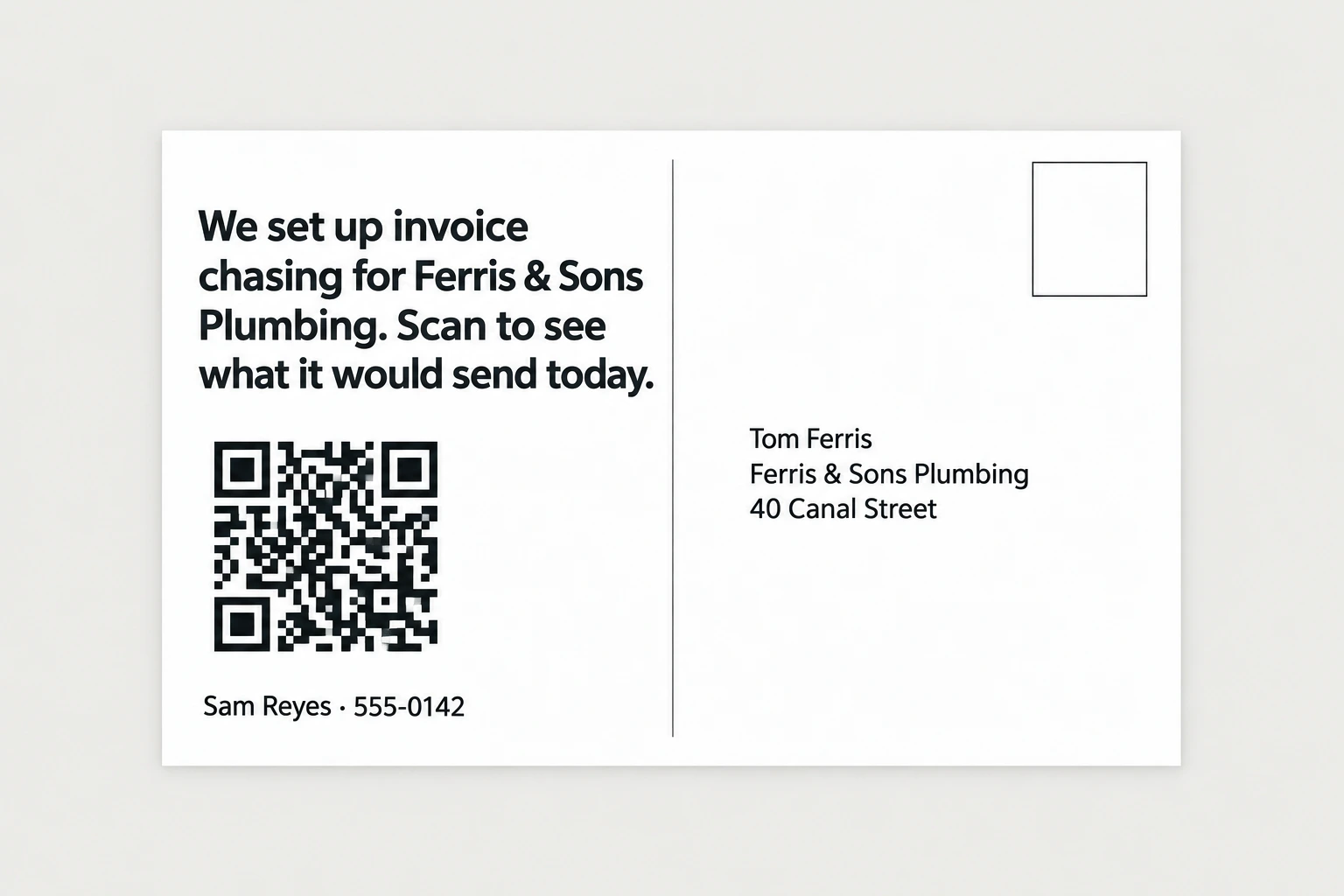
Postcard APIs like Lob, PostGrid, and Stannp mail real printed cards from an API call for a dollar or two each. The front is a screenshot of their demo page, cropped so the list of invoices with Jev's decisions is the thing you see. The back says "we set up invoice chasing for [business name]. Scan to see what it would send today." With the QR to the demo page and your phone number, because some owners will just call.
Owners of trade businesses open their mail because that's where checks, permits, and supplier bills come in, so a card with their own business name on it gets read. If you already have a way to reach the owner, like an email from their website, you can send the same link there too, but lead with the card.
Step 8: When they scan
Have the agent watch the demo links and message you whenever one gets opened, with the business name and how long they spent on the page. An owner who scanned the card and looked at the page for a minute is ready for a call, so call them that day. You don't need a pitch, you just ask if they saw the page and whether they want to try it on their real invoices.
On that call the owner will ask two things. The first is how you get paid, and the answer is a cut of whatever comes in from the invoices you chase, nothing up front. The second is whether messages go out without anyone checking, and the answer is that for the first batch you look at every single one before it's sent, and after that only the ones Jev isn't sure about come to you. If they don't pick up, the agent can send one short follow up a few days later, and that's it.
Step 9: The free first job
When an owner says yes, ask for their oldest unpaid invoices as a spreadsheet. QuickBooks, xero, freshbooks, and most invoicing tools let you export a list of open invoices with the customer, amount, invoice date, and email, and that's all the agent needs to start. If they have notes on any of them, like a customer who called to say they'd pay, ask them to add those too.
The agent runs them exactly the same way it ran the demo and shows you every decision and every message before anything goes out. The messages go out from the owner's own email and in their name. On Grok bot you can log into their email in the bot's browser, and on Hermes you connect the email account through its API, and either way the customer sees the business's address in their inbox and not a stranger's.
When I tested this on 60 invoices for a plumbing company, run twice, Jev got 53 of the 55 clear cases right both times, and it never once tried to chase an invoice that was already paid, under $50, or contacted in the last week. Whatever gets paid from that first batch goes straight into the owner's account, and that's what gets them to sign up for the rest.
Step 10: Fulfillment
Once they sign, connect their invoicing tool so the agent can see new invoices and payments as they happen, without anyone exporting anything. Then put it on a daily schedule, which on Grok bot is a routine and on Hermes is a scheduled task. Every morning it pulls every overdue invoice, asks Jev about each one, sends what Jev is sure about, and puts the rest in a short list for you, and when a customer pays, the agent marks the invoice paid so it drops out of the list.
At the end of each month the agent sends you and the owner a short statement listing every invoice that got paid after you chased it, the total that came in, and your cut. You invoice the owner for the cut from that statement, so there's never a question about what you're owed.
Step 11: Adding more clients
Every new client is the same skill with a copy of the rulebook and their own invoicing tool connected, so one agent can run all of them. The daily routine loops through each client in turn, and your review list shows which client each invoice belongs to. The demo pages and postcards keep running in the background for the next city or the next trade, so new owners are scanning cards while the agent is chasing invoices for the ones who already signed.
The full prompt
Once every step above works on its own, this is the whole pipeline in one message. Paste it in, fill in the brackets, and the agent saves it as one skill you can rerun on a new city with a single line.
you are my invoice chasing agent. run this pipeline and check in with me at the marked points.niche: [trade that bills after the job, e.g. plumbers] city: [your city]1. use my google places api key to pull every [niche] in [city]. save name, address, phone, website, rating, and review count.2. filter to: rating 4.0 or higher, 10 or more reviews, phone and website listed. show me the list and wait for my approval.3. for each approved business, make 10 mock invoices in their name, 15 to 60 days overdue, run them through my invoice rulebook skill with jev (model typesafe-ai/jev through my vercel ai gateway key), and build a demo page: their name and logo, each invoice with jev's decision and probability, the message that would go out for the top 3, reasons for stopped invoices, the total unpaid at the bottom, marked clearly as mock data, ending with "send us your 20 oldest unpaid invoices and we'll run them for real, free."4. design postcards: front is a screenshot of the demo page, back says "we set up invoice chasing for [business name]. scan to see what it would send today." plus a qr to the demo page and my number: [your number].5. show me 3 sample demo pages and 3 sample postcards. after i approve, send the batch through my [lob / postgrid / stannp] account and log every send in a spreadsheet.6. message me whenever a demo page is opened, with the business name and time on page.7. when a client sends real invoices or connects their invoicing tool, run them every day through their copy of the rulebook, write each message in the owner's name with invoice number, amount, job, and pay link, and show me every decision and message before anything is sent. keep a running total of what gets paid and send me and the owner a statement at the end of each month.rules: never message a client's customer without my approval until i tell you otherwise. never chase an invoice marked paid. no mail without my batch approval. cap api spend at [$x] without asking. save this workflow as a skill.