
Guide 02
Review cards for businesses
Guide 2: agent setup, review gap scraping, AI card photos, and live SMS demos
5 min read9 steps10 promptsfreeThe offer
Review automation is simple: after every job, the business's customer automatically gets a text with a direct link to leave a Google review. More reviews means the business ranks higher on Google Maps and gets more calls, and every owner already knows this. They just never ask their customers, because asking is awkward and they forget.
This is an easy sell because the owner can see the problem in one number, which is their review count sitting next to their competitor's. And since the automation runs every month, it's recurring revenue for you by nature. Every step below comes with the exact prompt to paste in.
Step 1: Set up the agent
The install and the two agent options are on the agent setup pageUse a strong model, because this pipeline involves judgment calls and a weak model makes expensive mistakes with real mail.
After that, give it the keys for the job. In chat, tell the agent which accounts it's working with and paste the credentials when it asks: a Google Places API key from Google Cloud Console with the places API enabled and a hard budget cap on it, a postcard API account with Lob, PostGrid, or Stannp, an OpenAI API key for generating the card photos with the ChatGPT image model, and a Twilio number for the SMS demo and the review automation itself. On Grok bot you can also log into a website once in the bot's browser and it stays logged in.
Step 2: Scrape and filter for review pain
The agent pulls every business in your niche in a city through the places API, saving the name, address, phone, rating, review count, and place id, and then filters for businesses that are losing on reviews:
- Rating 4.0 or above, because they do good work and their happy customers just never get asked
- Review count under 50, in niches where the top businesses have hundreds
- Phone number listed, because you need reachable owners and the service itself runs on SMS
Pick niches where customers are happy but don't think to leave reviews, like plumbers, HVAC, cleaners, auto repair, dentists, and landscapers.
use my google places api key to pull every [niche] in [city]. save name, address, phone, rating, review count, place id, and the owner's name if it appears in their review replies. filter to rating 4.0 or higher, fewer than 50 reviews, and a phone number listed. put it in a google sheet called "[niche] [city] reviews" and show me the count.Step 3: Pull the competitor numbers
Then the agent pulls the top 3 businesses in the same niche and city and saves their review counts, because that comparison is your pitch. "You have 23 reviews. The top plumber in your city has 340." one line, and the owner feels it immediately.
Use the top competitor in the same part of the city where you can, because an owner compares themselves to the business down the road, not one across town.
for [niche] in [city], find the 3 businesses with the most google reviews. for every business on my "[niche] [city] reviews" sheet, add the name and review count of the closest top competitor within [x] miles. then add a column with the line: "you have [their count] reviews. [competitor name] has [competitor count]." show me the sheet and wait for my approval on who to mail.Step 4: Make the personalized card photo
This is the part that makes the postcard impossible to ignore: a photo of a person holding a handwritten card with the owner's name on it, something like "hi mike, I pulled up [business name] and you deserve way more reviews."
Generate these with ChatGPT's image model, which handles text inside images cleanly so the name on the card comes out readable. One prompt describes the scene, and the agent runs it through the API once per prospect while swapping in each owner's name. Keep the same person and setting across every image so all your cards look like they came from the same sender. This is the image prompt i'd start from:
a realistic photo of a friendly woman in her 30s sitting at a wooden desk in a bright home office, holding up a white handwritten card toward the camera with both hands. the card says in blue pen: "hi [owner or business name], you deserve way more reviews." natural window light, shallow depth of field, shot on a phone, the handwriting clearly readable.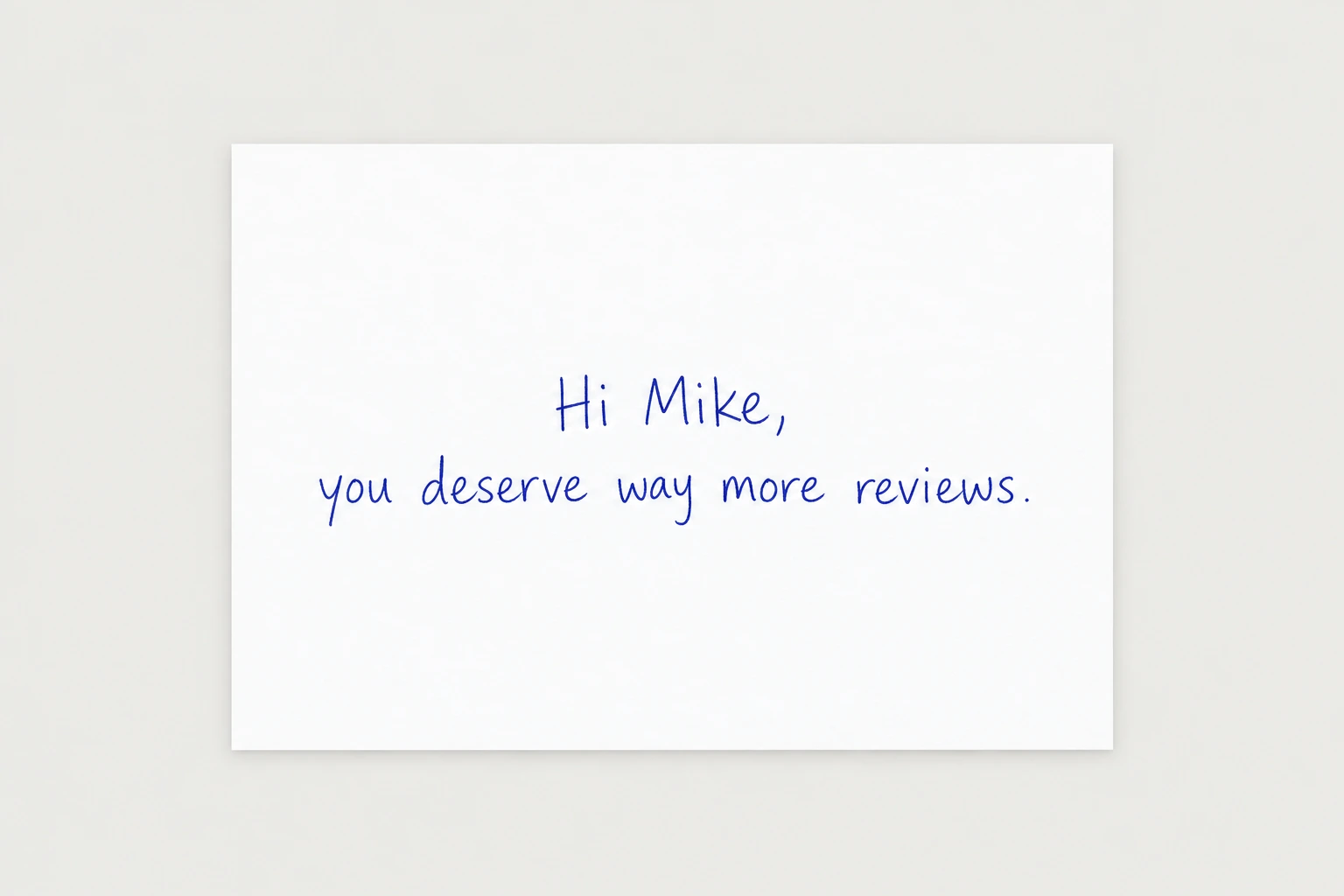
for every approved business, generate one photo with the chatgpt image model using this prompt: [paste your image prompt], swapping in the owner's first name if we have it and the business name if we don't. keep the person, desk, and lighting identical across every image. check that the name on the card is spelled correctly in each one, regenerate any that aren't, and show me the first 5.Step 5: Build the live SMS demo
Don't send them to a sales page. Send them to a page that says "text this number and watch what your customers would get", and when they text it, which is a Twilio number the agent manages, the automation replies with the exact review request their customers would receive, with their business name in it and a working link to their own Google review page.
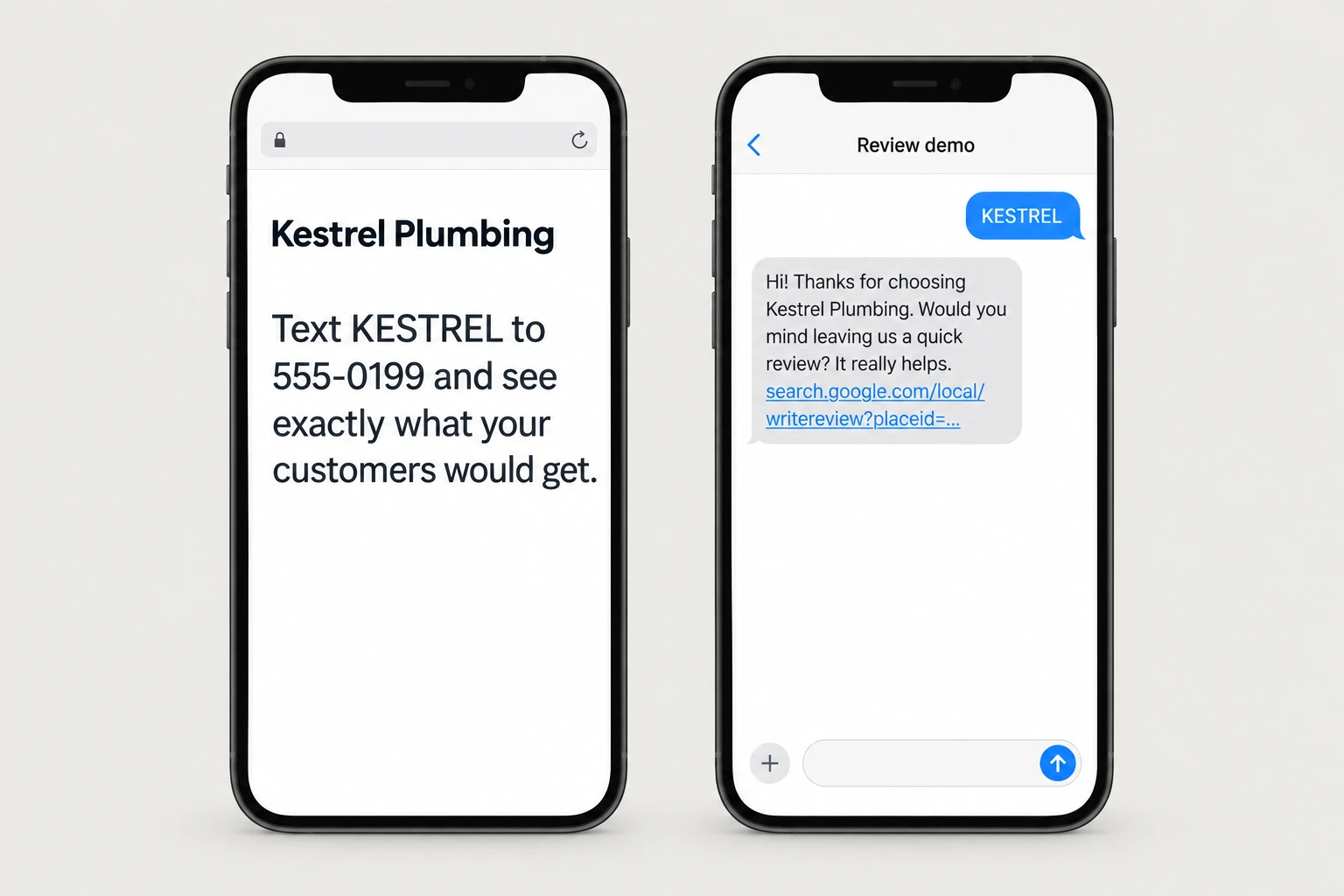
The direct review link is free to build because Google gives every business a review URL from its place id (search.Google.Com/local/writereview?Placeid=...), and since the agent already has the place id from the scrape, every demo is personalized before the owner ever scans the card. Each business gets its own demo page with its own code, so when a text comes in the agent knows which business it's for.
for every approved business, build a demo page with their name at the top and this line: "text [code] to [my twilio number] and see exactly what your customers would get." give each business a short unique code. when a text with that code arrives, reply within a few seconds with: "hi! thanks for choosing [business name]. would you mind leaving us a quick review? it really helps. [direct review link built from their place id]". then message me that [business name] tried the demo.Step 6: Send the postcard
Postcard APIs like Lob, PostGrid, and Stannp send real printed postcards from an API call for around 1 to 2 dollars a card. The front is the photo of the person holding the card with their name, and the back has the comparison line with their real numbers plus a QR code to their demo page. A card with the owner's own name in a photo does not go in the trash the way printed ads do.
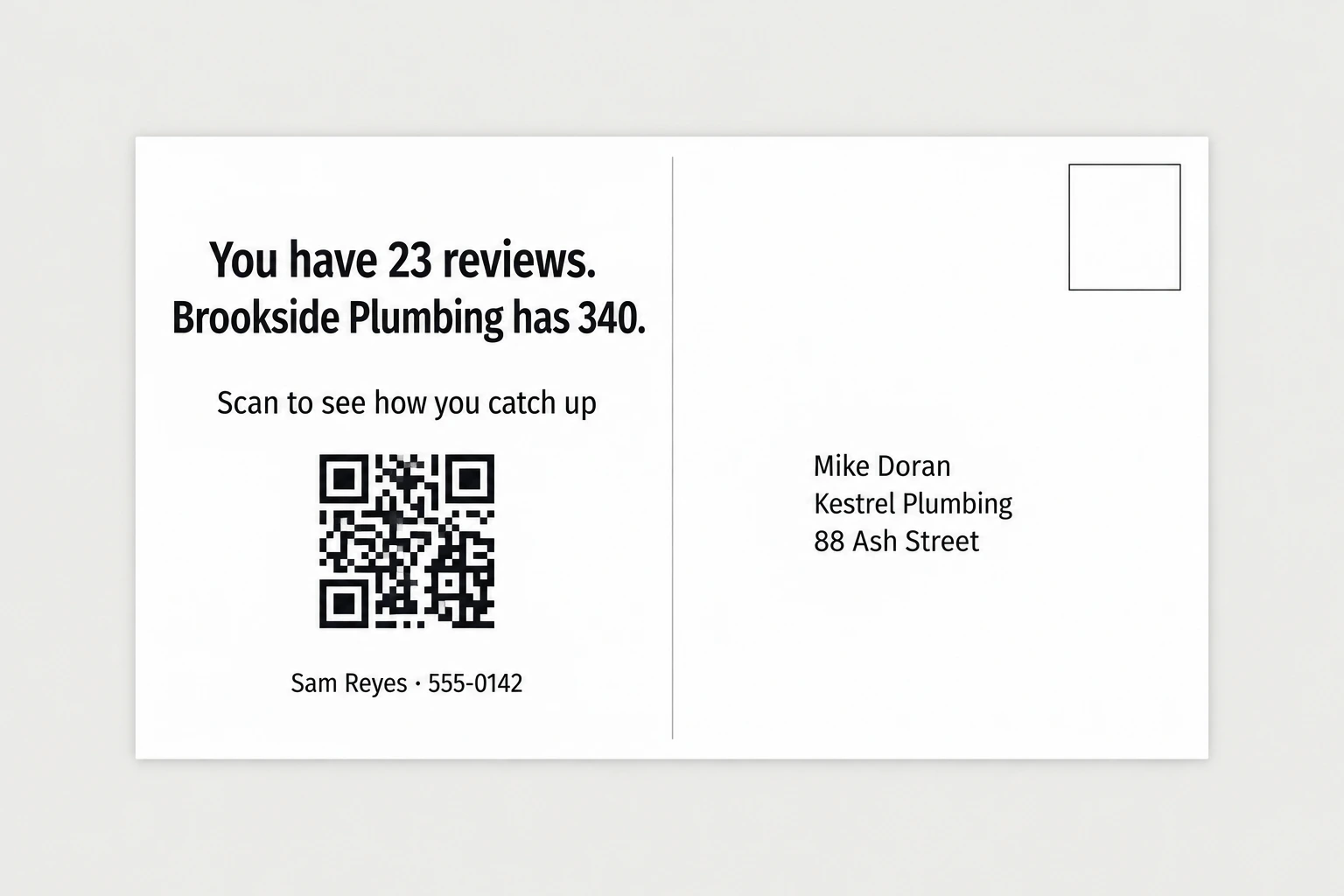
design a 6x9 postcard for each approved business. front: their card photo, full bleed. back: the line "you have [x] reviews. [competitor] has [y]." in large text, then "scan to see how you catch up" with a qr code to their demo page, and my name and number: [your name], [your number]. show me 3 samples. after i approve, send the batch through my [lob / postgrid / stannp] account and log every send in the sheet with the date.Step 7: When they try the demo
An owner who texted the demo number has already seen the product work on their own phone, so call them the same day. The conversation is short, you ask if they saw the text come through and whether they want their customers getting that after every job. For owners who scanned but didn't text, one follow up text a few days later is enough.
every morning, send me a list of businesses that scanned their card or texted the demo in the last 24 hours, with their phone number and what they did. for anyone who scanned but didn't text after 3 days, draft one follow up: "hi, it's [your name], i sent the card about [business name]'s reviews. did you get a chance to try the demo?" send after my approval, and only once per business.Step 8: Fulfillment
When a client signs, the automation is one flow. The owner sends each customer's name and number after a job, or you connect their invoicing or booking tool, and the system texts the customer the review link a few hours later with one polite follow up a few days after if they haven't left one. The agent runs the whole flow on the same Twilio number, so the client never sees how it works, they just see the review count going up.
The easiest way to start is a simple form or a text the owner sends after each job, like "jane 555 0100", and later you connect whatever tool they already use, like Jobber, Housecall Pro, or Square, so it happens without them doing anything.
set up review automation for [business name]. when [owner] texts my twilio number a customer's name and phone after a job, or when a job is marked complete in their [jobber / housecall pro / square], wait 3 hours, then text the customer: "hi [customer], thanks for choosing [business name]! would you mind leaving a quick review? [review link]". if they haven't left a review in 3 days, send one follow up. never text the same customer more than twice. check their review count every day and log it.Step 9: The monthly report
What keeps a client paying every month is seeing the number go up, so the agent sends each owner a short report at the start of every month with how many requests went out, how many new reviews came in, and where they now sit against the competitor from the postcard.
on the 1st of every month, for each client, send the owner a short text report: requests sent last month, new reviews that came in, their total review count now, and the gap to [competitor from their postcard]. show me the reports before they go out for the first 2 months, then send them automatically.The full prompt
Once every step above works on its own, this is the whole pipeline in one message. Paste it in, fill in the brackets, and the agent saves it as one skill you can rerun on a new city with a single line.
you are my review automation sales agent. run this pipeline and check in with me at the marked points.niche: [your niche] city: [your city]1. use my google places api key to pull every [niche] in [city]. save name, address, phone, rating, review count, and place id for each.2. filter to: rating 4.0 or higher, fewer than 50 reviews, phone number listed. also pull the top 3 [niche]s in [city] by review count and note their numbers.3. show me the filtered list with each business's review count next to the top competitor's. wait for my approval.4. for each approved business, generate a photo with the chatgpt image model: the same person in every image, holding a handwritten card that says "hi [business name], you deserve way more reviews." keep the person and the setting identical across all images.5. build each business a demo page that says "text this number and see exactly what your customers would get." when someone texts my twilio number, reply with the review request message containing their business name and their direct google review link built from their place id (search.google.com/local/writereview?placeid=...).6. design postcards: front is the card photo, back says "you have [x] reviews. the top [niche] in [city] has [y]." plus a qr to the demo page and my number: [your number].7. show me 3 samples. after i approve, send the batch through my [lob / postgrid / stannp] account and log everything in a spreadsheet.8. every morning, tell me who scanned or texted the demo.rules: never send mail or texts without my batch approval. cap api spend at [$x] without asking. save this workflow as a skill.