
Guide 05
Facebook leads for trades
Guide 5: catching people who are asking for a service right now
4 min read9 steps9 promptsfreeThe concept
Every local Facebook group has the same post over and over. "Anyone know a good plumber?" "Looking for someone to redo our fence." "Can anyone recommend a photographer for a wedding?" Each of those posts is a person with money in hand asking in public right now, and under each one, locals recommend businesses by name.
The usual way to find businesses to sell to is scraping Google Maps, but this one finds them at the exact moment demand shows up. An agent watches the groups, catches the requests and the businesses being recommended, builds the deliverable, and sends a postcard, which is a much warmer starting point than any cold list. Every step below comes with the exact prompt to paste in.
Step 1: Set up the agent
The install and the two agent options are on the agent setup pageUse a strong model, because this pipeline involves judgment calls and a weak model makes expensive mistakes with real mail.
After that, give it the keys for the job. In chat, tell the agent which accounts it's working with and paste the credentials when it asks: a Facebook account signed in on the agent's browser, since Facebook has no public API for groups and the agent works through a logged in browser session, which on Hermes means a browser on your machine and on Grok bot means the bot's own browser that you log into once, plus a Google Places API key with a budget cap and a postcard API account with Lob, PostGrid, or stannp.
Step 2: Find and join the groups
Join the community groups for one city yourself, the buy and sell groups, the neighborhood groups, and the "[city] recommendations" groups, because the agent should only read groups your account is already a member of. The agent can find them for you first, and then you join them by hand over a few days so the account looks normal.
search facebook for local community groups in [city] and the nearby towns: neighborhood groups, "[city] recommendations", moms groups, buy and sell groups, and new residents groups. only list groups with more than [x] members and at least a few posts a day. give me a list with each group's name, link, member count, and roughly how many posts a day it gets. don't join anything, i'll join them myself.Step 3: Set up the watcher
Hand the list of groups you joined to the agent. Keep its behavior human, which means it reads new posts a few times a day and flags what matters, and it never comments, DMs, or mass messages, because that's how accounts get banned. The agent is a reader here, not a poster, and on Grok bot this runs as a routine a few times a day.
these are the facebook groups i've joined: [paste links]. three times a day, at random times between 8am and 9pm, open each group through the logged-in browser and read the posts from the last 8 hours, scrolling like a normal person would. flag every post where someone is asking for a local service, like "anyone know a good...", "looking for someone to...", "can anyone recommend...", "need a...". never like, comment, post, react, or message anyone. save each flagged post's link and text in a google sheet called "[city] requests".Step 4: Catch two lists
From every service request post, the agent pulls two things. The first is the request itself, meaning what service, which area, and how urgent, which tells you which trades are in demand in that city this month. The second and more valuable is the businesses named in the comments, because "call mike at [company], he did our roof" is a business with active word of mouth. The agent logs each name and counts how often it comes up across posts.
for every flagged post in "[city] requests", save: the service being asked for, the area or neighborhood if mentioned, how urgent it sounds (today, this week, just looking), and the date. then read the comments and save every business or person recommended by name, with the exact comment. in a second tab called "recommended", keep one row per business with a running count of how many different posts it was recommended in.Step 5: Match them to places data
Now the agent feeds those business names to the Google Places API and gets back the address, phone, review count, and whether they have a website for each recommended business. This is where the gap shows up, because a business that got recommended four times this month with no website and 12 reviews is being handed customers by word of mouth and losing everyone who googles them afterward.
for every business in the "recommended" tab, look it up with my google places api key using its name and [city]. save address, phone, rating, review count, place id, and whether a website is listed. if you can't find a confident match, mark it "no listing", because that's a gap too. then mark each business's gaps: no website, fewer than 30 reviews, a storefront, or phone-heavy (a trade where customers call to book).Step 6: The weekly digest
Once a week the agent sends you a digest, which is the part you actually read. It shows which services people were asking for most and the recommended businesses ranked by how often they came up, with their gaps next to them. You pick the ones to go after, and nothing gets built until you do.
every [monday] at 9am, send me a digest: the 5 services people asked for most this week, then the top 15 recommended businesses ranked by mentions, each with their mention count, review count, rating, and gaps. include one real quote from a comment recommending them. wait for me to pick businesses from the digest.Step 7: Make the service
Pick the deliverable based on what the data says is missing. A business with no website gets one built from a niche template filled with their real data, which guide 1 covers in full. A good rating with a low review count gets a review automation demo from guide 2, a storefront gets an NFC tap card from guide 3, and a phone heavy business gets a voice agent demo from guide 4. you build first and then mail, so this guide just replaces cold scraping with a warm trigger.
for each business i picked from the digest, build the deliverable that matches its biggest gap: no website means a site from my [niche] template (guide 1 skill), low reviews means a review demo page (guide 2 skill), storefront means a tap card order (guide 3 skill), phone-heavy means a voice agent demo (guide 4 skill). show me each one before moving on.Step 8: The postcard
Here's why this converts better than any cold send: the card references a real moment. "People in [group name] were asking for a plumber last week, and your name came up. We built the website they were looking for, scan to see it." The owner knows the recommendations are real because they hear about them from customers, so you're not a stranger guessing they need something. You watched demand point at them and showed up with the thing already built.
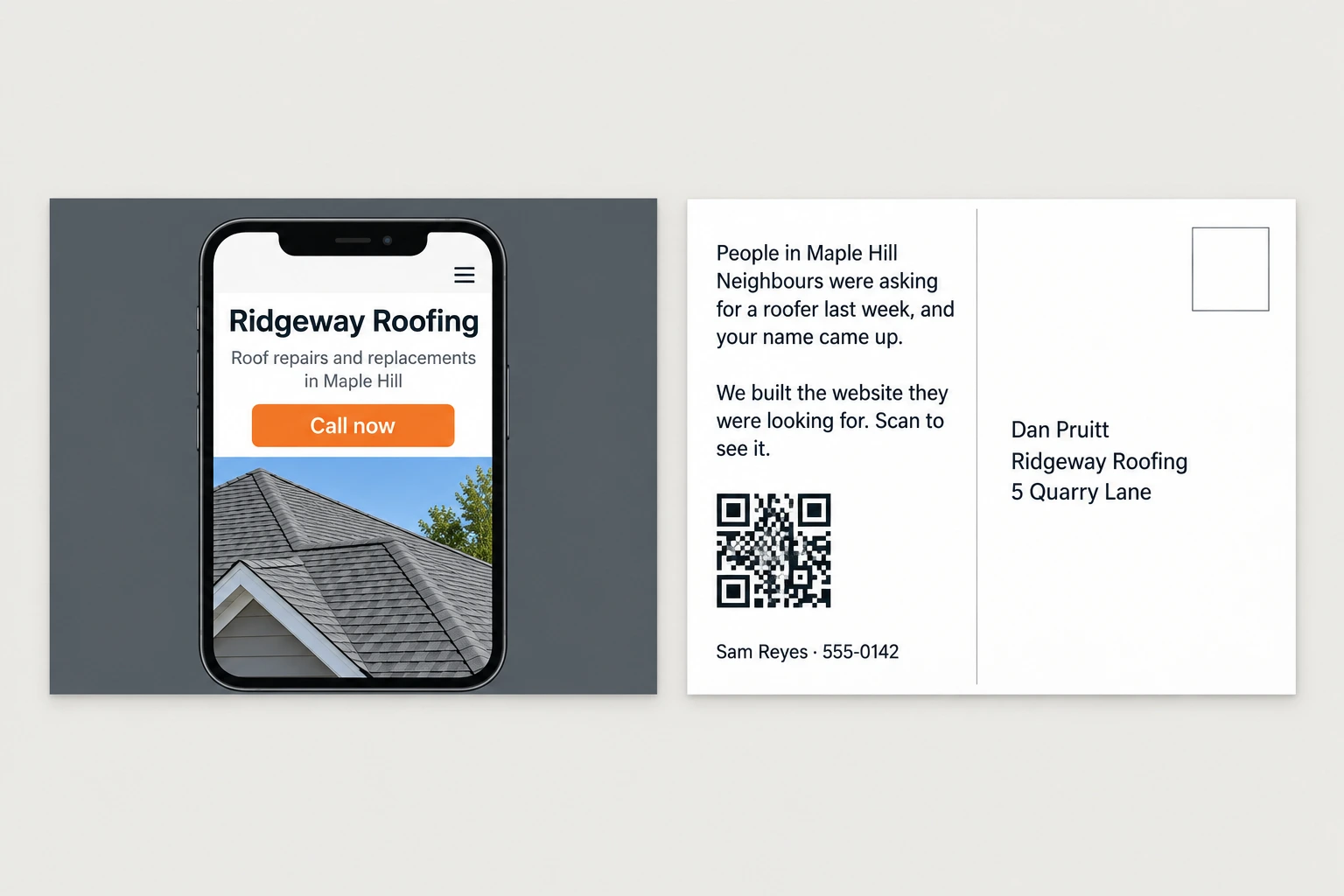
design a 6x9 postcard for each picked business. front: a screenshot of what we built for them. back: "people in [group name] were asking for a [service] last week, and your name came up. we built [the thing] so they can find you. scan to see it." with a qr to the deliverable and my name and number: [your name], [your number]. show me every card before sending, then send through my [lob / postgrid / stannp] account and log it.Step 9: The second offer: sell the watcher itself
Once a business signs for anything, you have a natural follow up, because the agent that caught them can work for them. Every time someone in their area posts asking for their trade, the owner gets an alert within minutes with a link to the post, and since whoever shows up first in those comments usually wins the job, owners know exactly what that's worth. They just can't sit on Facebook all day.
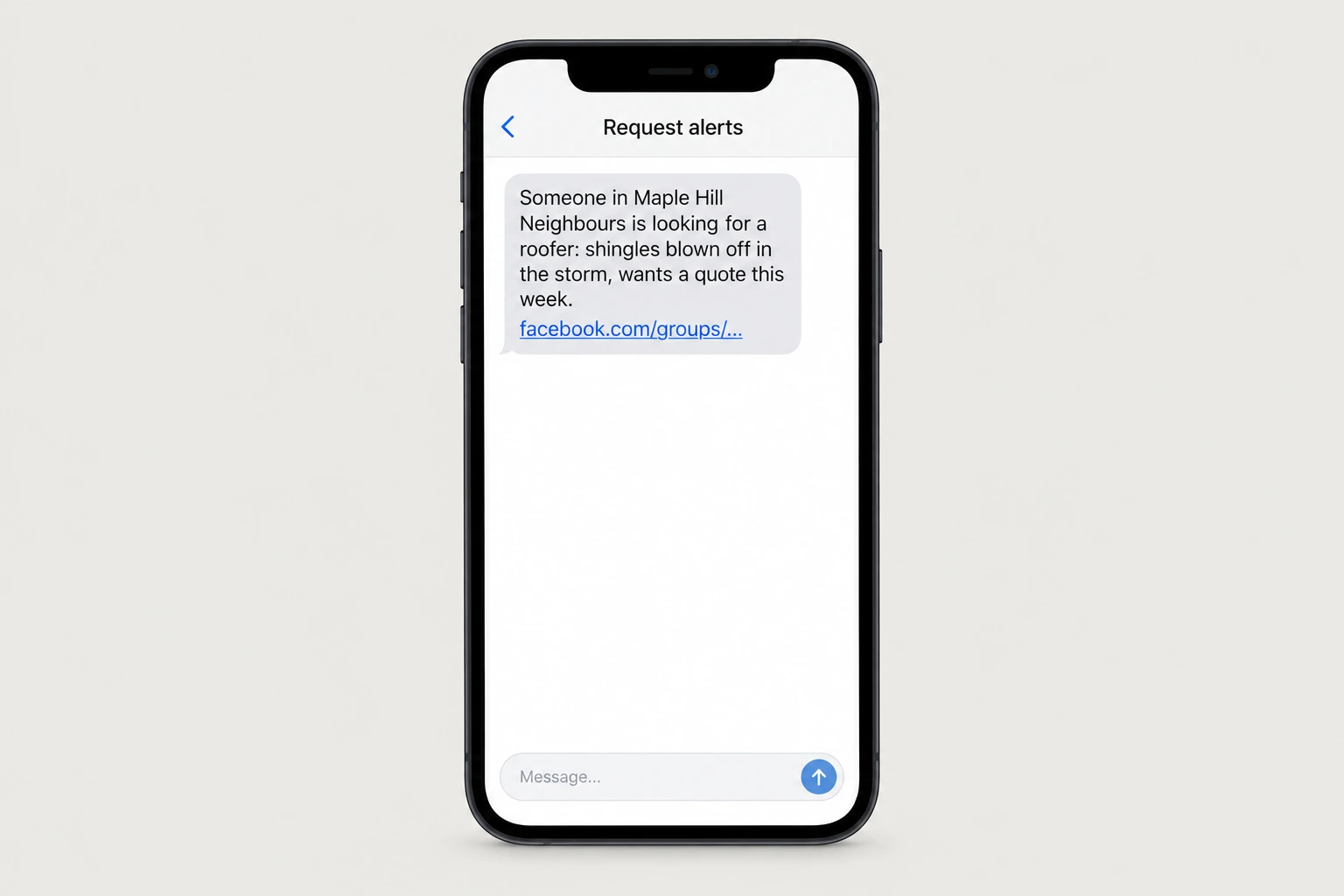
This one is a recurring service with almost zero delivery cost, because the watcher is already running for your own prospecting, and all you're adding is a text to the owner.
[business name] is a [trade] in [area] and signed up for request alerts. whenever you flag a post in my groups asking for a [trade] in or near [area], text [owner's number] within 15 minutes: "someone in [group name] is looking for a [trade]: [short summary]. [post link]". never send the same post twice, and send me a count of alerts each week.The full prompt
Once every step above works on its own, this is the whole pipeline in one message. Paste it in, fill in the brackets, and the agent saves it as one skill you can rerun on a new city with a single line.
you are my facebook demand watcher. run this pipeline and check in with me at the marked points.city: [your city]groups: [paste the names or links of the facebook groups you've joined]1. a few times a day, read new posts in these groups through the logged-in browser. flag posts where someone asks for a service: "anyone know a good...", "looking for someone to...", "can anyone recommend...".2. from each flagged post save: the service requested, the area, how urgent it sounds, and every business name recommended in the comments. keep a running count of how often each business gets named across posts.3. for each recommended business, look it up with my google places api key: address, phone, review count, and whether a website is listed.4. every [day / week], send me a digest: which services were in demand, and the recommended businesses ranked by mentions, with their gaps marked (no website / low reviews / storefront / phone-heavy).5. when i pick a business from the digest, prepare the matching deliverable and a postcard that references the real moment: "people in [group name] were asking for a [service] last week, and your name came up." show me everything before anything is sent.rules: read only. never comment, dm, post, or react. keep browsing volume human with a few sessions a day at most. no mail without my approval. save this workflow as a skill.