
Guide 12
Whop payments for businesses
Guide 12: get paid every month a business you moved keeps taking payments
6 min read8 steps8 promptsfreeThe offer
Whop takes a processing fee on every sale a business makes on its platform, somewhere around 3%, and the partner program pays you 30% of Whop's cut on every payment a business you referred takes, for as long as they keep processing, with a six month minimum that extends as you bring more volume. It comes out of Whop's side rather than the business's, so nothing about your introduction costs the owner anything.
The math is straightforward. A business doing $10,000 a month puts a little under $90 a month in your account, one doing $100,000 a month is closer to $870, and one doing $300,000 a month is around $2,600. Five or ten of those is a real monthly income from introductions you made once. Partners have earned over $10 million from the program so far, and there's a second tier too, where partners you refer earn you a share of what their referred businesses generate, plus 1% of a referred business's ad spend.
This is the only guide in the set where you don't build a service and don't send an invoice. You find a business already taking payments in a way that's costing them, move them, and get paid by Whop every month after that. Every step below comes with the exact prompt to paste in.
Step 1: Join the program
Apply from your Whop dashboard, which takes a few minutes and is open worldwide. Once you're in, you create a referral from the dashboard with the business name, their website, and their estimated revenue, and Whop gives you a referral link and an email invite you can send them, which locks the attribution to you so the deal stays yours to close.
Read the current fee and payout terms on Whop's own pages before you quote anything to an owner, because the percentage and the minimum are the two numbers your whole pitch rests on and they're the two most likely to change. The referral link also takes business_type and industry_type so the signup form is pre-filled for the kind of business you're sending, which removes a step for the owner.
Step 2: Set up the agent
The install and the two agent options are on the agent setup pageUse a strong model, because this pipeline involves judgment calls and a weak model makes expensive mistakes with real mail.
After that, give it the keys for the job. In chat, tell the agent which accounts it's working with and paste the credentials when it asks: your Whop partner account and referral link, a Google Places API key from Google Cloud Console with the places API enabled and a budget cap on it, and a postcard API account with Lob, PostGrid, or Stannp. Your Whop login also needs to be in the agent's browser, since it builds stores in your account. On Grok bot you can also log into a website once in the bot's browser and it stays logged in.
Step 3: Pick one pocket and qualify
Don't go wide. Pick one kind of business and learn how it operates, because the second one in the same niche takes a fraction of the time and the owners talk to each other. A business qualifies when it has an offer that's already selling, payments that repeat, visible sales activity you can see from outside, a payment setup that's costing them, and an owner you can actually reach.
There are two pockets that work, and they're found in completely different ways. Online sellers are communities, course creators, newsletters, and anyone on a platform charging high fees, and you find them on public leaderboards and top seller lists. Local businesses became a real target once Whop added tap to pay on iPhone and QR checkout links, which means a shop can take card payments in person without a terminal, and Google Maps is now a lead list for this.
For local, what you're looking for is a business taking payments awkwardly. Cash only, Zelle or Venmo at the counter, a PayPal link, a card machine with no online checkout, or a booking page that can't take a deposit. Reviews mention this constantly, so that's where the agent looks.
use my google places api key to pull every [jewelry store / boutique / detailer / tattoo studio / tree service / gym] in [city]. save name, address, phone, website, rating, review count, and the text of their 30 most recent reviews.for each one, note how they take payment: look at their website for a checkout, a booking page, or a payment link, and search their reviews for mentions of cash only, venmo, zelle, paypal, "card machine down", "no card", or deposits.rank them by how awkward their payment setup looks, with cash or peer-to-peer apps at the top. show me the top 30 with the evidence for each.
for online sellers instead: pull the top [newsletters / communities / course creators] in [category] from [substack's category leaderboard / the platform's top sellers list]. for each one save the name, the platform they sell on, the fee that platform charges from its public pricing page, their subscriber or member count if it's shown, their price, and the owner's contact. estimate their monthly revenue and what they're paying in fees. show me the list sorted by what they'd save.Step 4: Build their store before you speak to them
This is the part that makes the introduction land. Whop lets you build a store for any business in your own account before the owner has ever heard of you, so the agent takes their public information, their name, their logo, what they sell, their prices, and their tiers, and builds the whole thing out. Then what you send isn't a pitch about a payment platform, it's their own store, finished, with checkout working.
For a local business the store is their services with prices, a QR checkout for the counter, and deposits for booked work. For an online seller it's their tiers rebuilt exactly as they have them now, so the owner can see their own offer running with a lower fee underneath it.
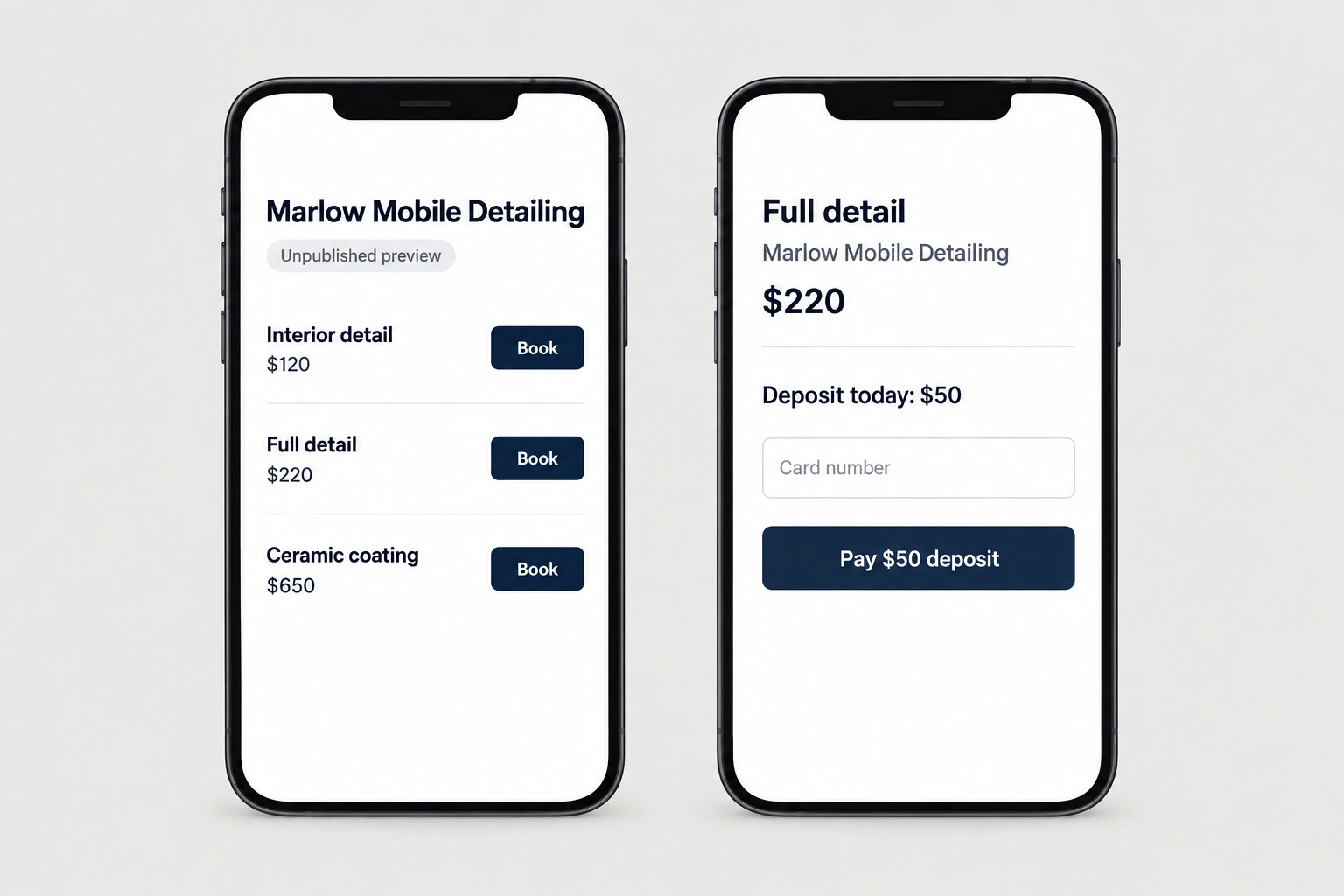
for each approved business, build a whop store in my account using only their public information: their name, logo and colors from their site, their products or services with prices, and their tiers if they have them. for local businesses, set up qr checkout and a deposit option for bookings. for online sellers, rebuild their current tiers exactly.keep every store unpublished and take clean screenshots of the storefront and the checkout on a phone. show me the first 3 before building the rest.
Step 5: The postcard
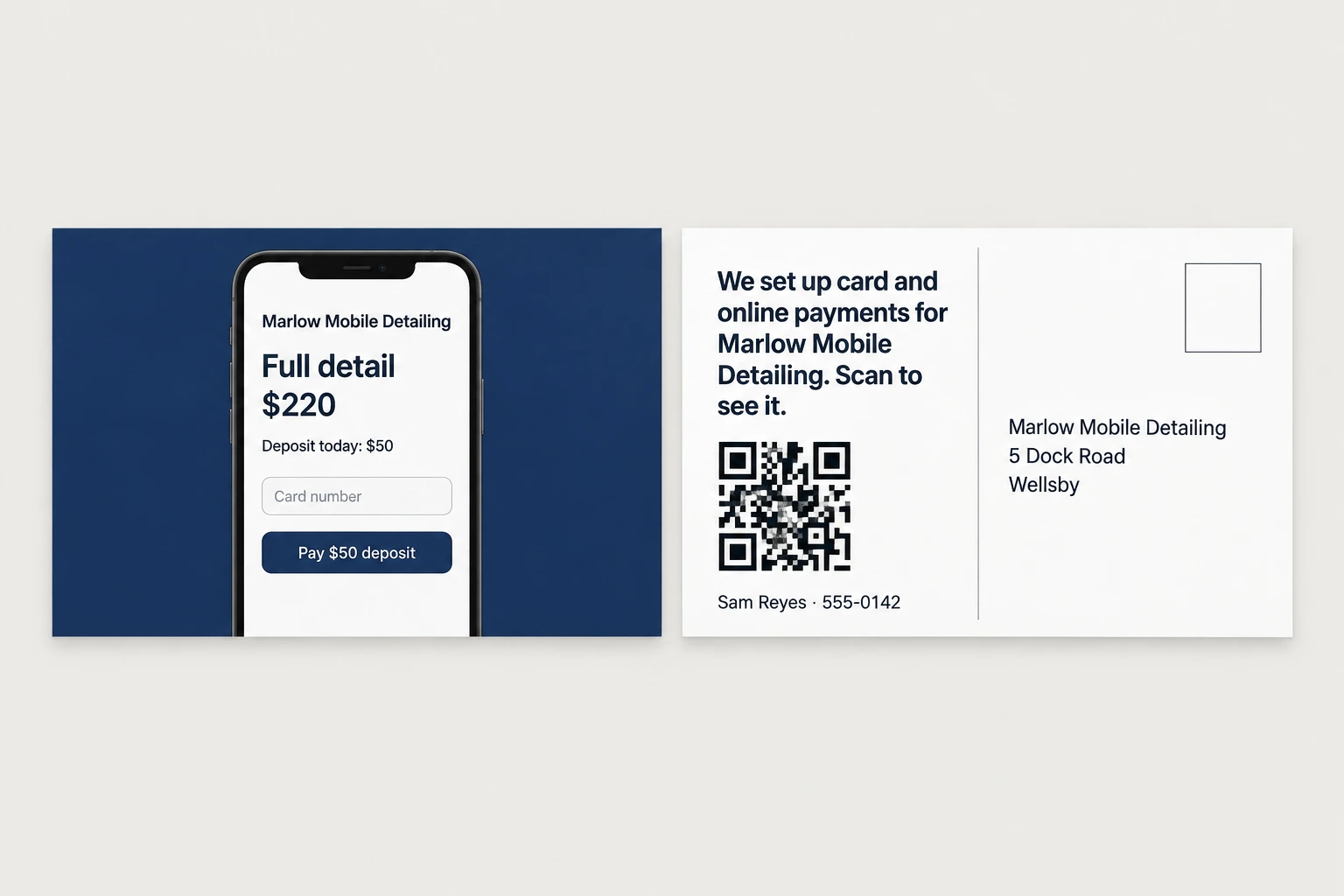
Postcard APIs like Lob, PostGrid, and Stannp mail real printed cards from an API call for a dollar or two each. The front is a screenshot of their store on a phone with the checkout showing, and the back says "we set up card and online payments for [business name]. Scan to see it." With the QR going to a page with their store screenshots and one button to claim it through your referral link.
The claim button has to be the only way in, exactly like the affiliate guide, because if the owner googles Whop and signs up on their own, the commission doesn't track to you.
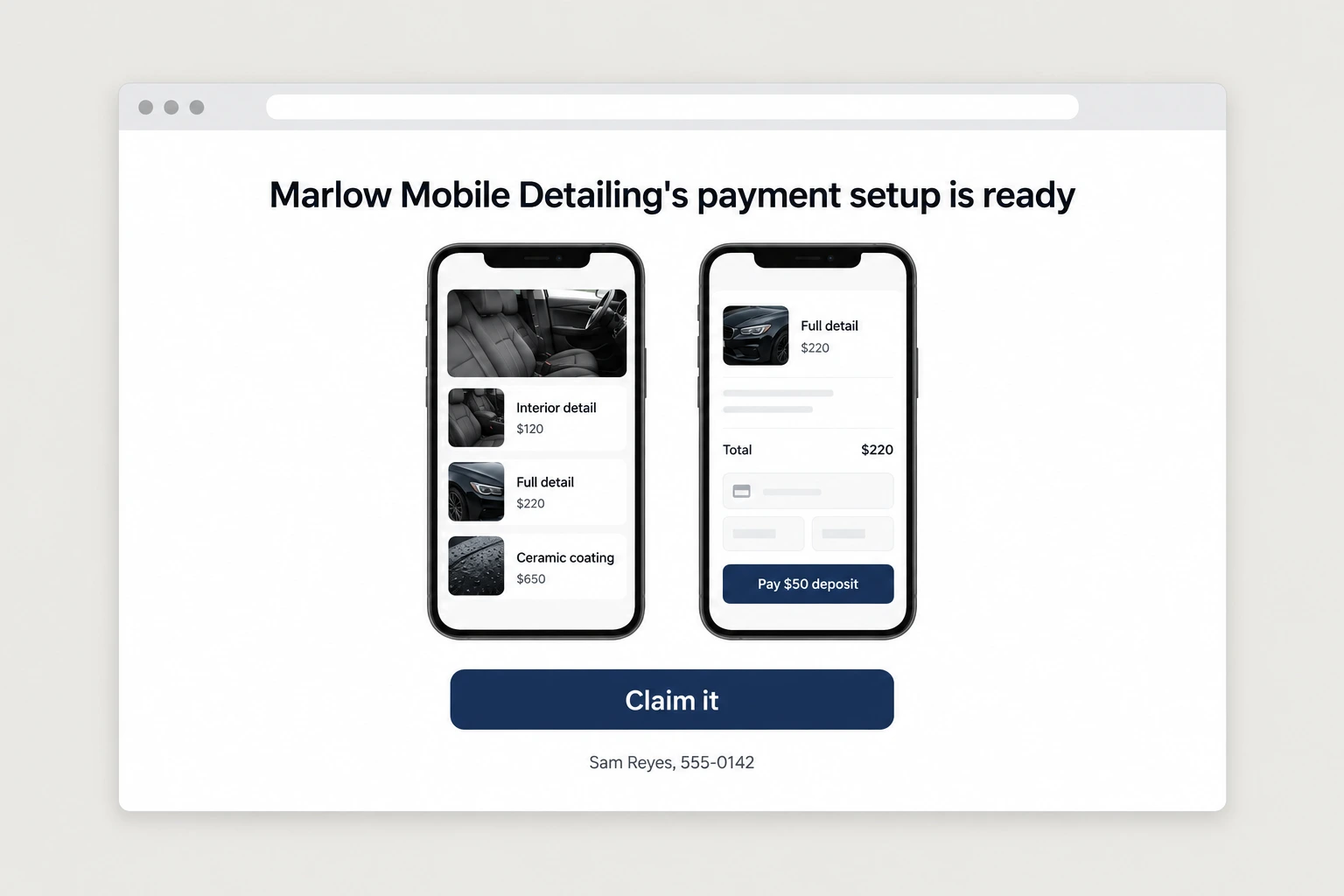
for each business, host a page showing their store screenshots with the line "[business name]'s payment setup is ready" and one button: "claim it". that button must be my whop referral link with business_type and industry_type set for their kind of business. no other link to whop anywhere on the page.then design a 6x9 postcard: front is the phone screenshot of their store checkout, back says "we set up card and online payments for [business name]. scan to see it." with a qr to that page and my name and number: [your name], [your number]. show me 3 samples, then send the batch after my approval and log every send.
Step 6: The conversation
When an owner calls, the conversation is about their money and their time, not about features. For a local business it's that customers can tap a card or scan a code instead of being sent to an ATM, and that deposits stop no-shows. For an online seller it's the fee they're paying now against Whop's, worked out on their own revenue, which is a number the agent can have ready before the call.
The objection you'll actually hit is not price, it's that switching sounds like a mess. So the answer is that you do the move, their store is already built, and they keep running the old setup until the new one is taking payments.
for [business name], prepare a one page summary before my call: what they sell, how they currently take payments, an estimate of their monthly volume, what their current setup costs them in fees or in lost sales, what the same volume would cost on whop, and the three things that change for them on day one. keep it to plain numbers and no feature lists.Step 7: The migration is the service
The yes is the easy part and the move is where people lose the commission, because a store that's set up but never taking payments pays you nothing. So you run the move yourself, which is transferring the store into their account, getting their payout details connected, moving their products and prices over, setting up the QR code or the tap to pay on their phone for a local business, and standing there for the first real payment.
For an online seller with existing members, the move is the members, so you plan how current subscribers get switched over without anyone losing access, and you do it on a date the owner picks.
[business name] is joining. run the migration: transfer their store from my account to theirs, walk them through connecting payouts, move every product and price across, set up qr checkout and tap to pay on the owner's phone if they're local, and test one real payment end to end. for online sellers, write a plan for moving existing members over without losing access and show it to me first. after the first payment lands, check daily for a week that payments are still processing and tell me if anything stops.Step 8: After the first one
Once a business is processing, your work on it is done and the commission lands on its own every month. Two things compound from there. The first is referrals, because owners talk, and a business you moved sends you the next one without you doing any outreach, so ask every owner once the payments are working. The second is that everything you learned moving the first business in a niche makes the next one faster, and at some point the whole setup for that niche is one repeatable onboarding you can offer to every business in it.
keep a page for me showing every business i've referred: name, niche, date they started processing, their monthly volume, and my commission each month. every month, flag any business whose volume dropped or stopped so i can check on them. two weeks after each business's first payment, remind me to ask that owner if they know anyone else who takes payments the same way they used to.The full prompt
Once every step above works on its own, this is the whole pipeline in one message. Paste it in, fill in the brackets, and the agent saves it as one skill you can rerun on a new city with a single line.
you are my whop partner agent. run this pipeline and check in with me at the marked points.niche: [one kind of business] city or category: [city for local, category for online]1. build the list. for local: pull every [niche] in [city] with my google places api key, save their details and reviews, and rank them by how awkward their payment setup looks (cash only, venmo, zelle, paypal link, no online checkout, no deposits). for online: pull the top sellers in [category] from public leaderboards with their platform, fees, price, and audience size, and estimate what they pay in fees now.2. show me the ranked list with the evidence. wait for my approval.3. for each approved business, build a whop store in my account from their public information: name, logo, colors, products or services, prices, tiers. local businesses get qr checkout and a deposit option. keep them unpublished and screenshot the storefront and checkout on a phone.4. host a claim page per business with their screenshots and one button that is my whop referral link with business_type and industry_type set. that is the only link to whop anywhere.5. design postcards: front is the phone screenshot of their checkout, back says "we set up card and online payments for [business name]. scan to see it." with a qr to the claim page and my number: [your number]. show me 3 samples, then send the batch after my approval.6. before any call, give me a one page summary of what their current payment setup costs them and what changes on day one.7. when a business claims, alert me, transfer the store to their account, and run the migration until a real payment has gone through.8. keep a page of every referred business, their monthly volume, and my commission, and flag any that stop processing.rules: never let a claim path skip my referral link. never publish a store in my account. no mail without my batch approval. cap api spend at [$x] without asking. save this workflow as a skill.