
Lead gen systems · Guide 02 of 07
Photo makeovers for cafes
Four systems that find restaurants and cafes whose food is fine and whose pictures are not, rebuild the thing letting them down, and send it to the owner. Everything here works anywhere in the world and every prompt is written out in full.
14 min read8 steps6 promptsfree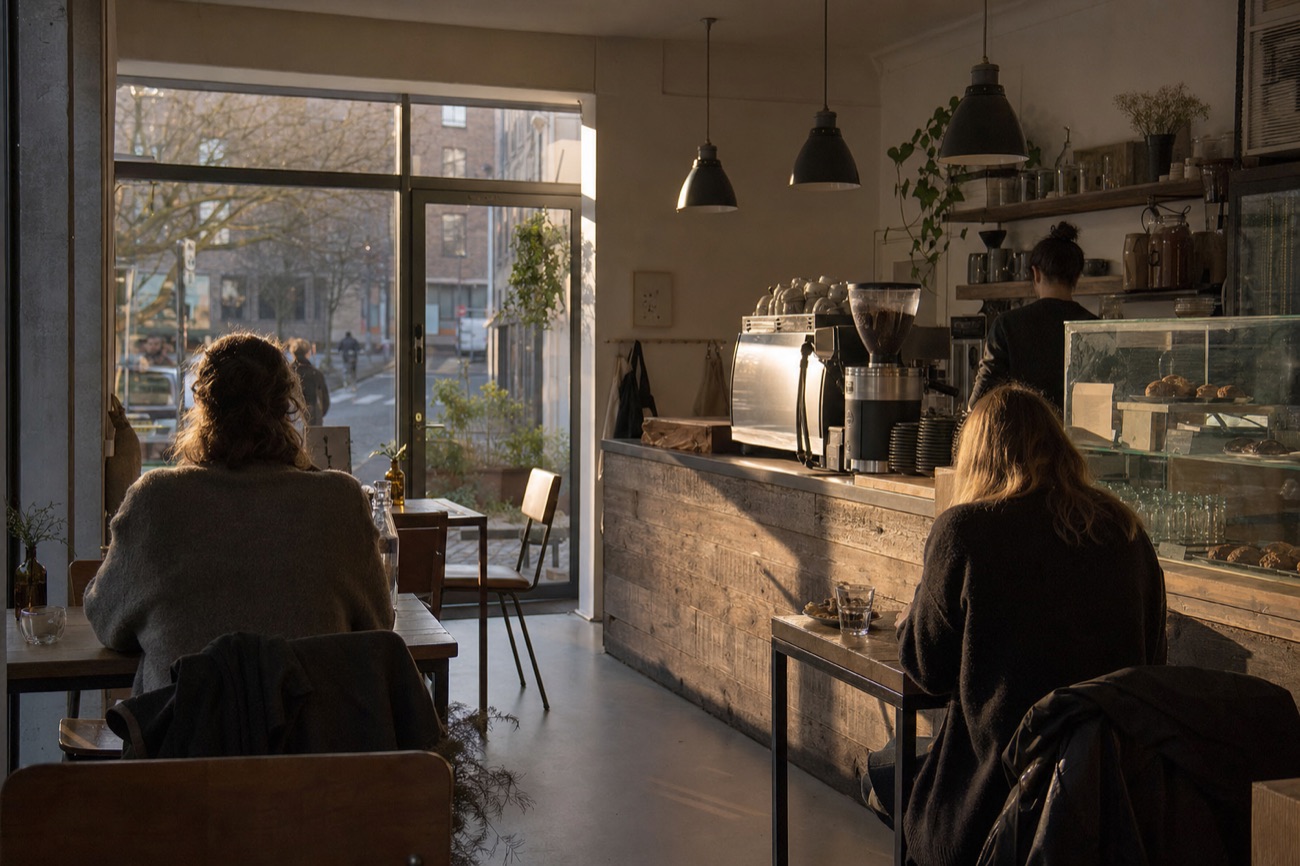
What this is, and how it works
A cafe with good food and bad pictures loses to a worse cafe with good pictures, every single day, and the owner cannot see it happening.
People decide where to eat by looking at a phone. They see the Google listing, four photos taken by customers, a star rating and a number of reviews. That is the whole shop window now, and for most independents nobody has ever deliberately built it.
So you find the ones where the gap is visible from the outside, rebuild the exact thing letting them down, and send it to them. You are not selling marketing. You are handing over a finished piece of their own shop window, already fixed.
The four systems in this guide all run on the same eight steps, and it is the same shape as every other guide in the series. Only steps 2 and 5 change.
The eight steps
- 1Find cafes and restaurants in one area.
- 2Qualify against a visible, checkable flaw.
- 3Capture their own real photos.
- 4Work out the honest numbers.
- 5Rebuild the thing that is letting them down.
- 6Put it on one page next to the original.
- 7Look at it yourself and approve it.
- 8Send it.
Why food is the easiest industry to start in
The flaw is public and countable. Google will tell you, for free, how many photos a place has, how many reviews, and what its rating is. You do not need to guess who needs help. You can sort a whole town by it.
And the owner already knows. Nobody who runs a cafe thinks their phone snap of a breakfast is good. They just have never had ten spare minutes and did not know it could be fixed for the price of a coffee.
One warning before you start. This industry is the most pitched to on earth. Every cafe owner gets three messages a week from someone offering social media management. The only thing that separates you is that you did the work first. Never send a message that describes what you could do. Send the finished thing.
The rule that keeps you out of trouble
Never change what the food actually is. You can relight it, reframe it and reshoot it. You cannot add a garnish that was not on the plate, make the portion bigger, or swap the crockery. The moment a customer orders it and it does not match, you have done the owner real harm and they will know exactly who to blame. The same rule covers the menu: the items and the prices are theirs, and you may not quietly correct either.
The example business, and it is real
Enclave Coffee and Bakehouse, 18 Wostenholm Road, Nether Edge, Sheffield S7 1LJ. Found with the search on the next page. 5.0 stars from 14 reviews, seven photos on the listing, and its menu is two handwritten chalkboards. Three of the four systems in this guide are demonstrated on this one real cafe, using its own real Google photos.
What you need, and how to find the right cafes
Four accounts. Two need a card. This is a cheaper stack than the solar guide because there is no expensive measurement API, only photos and text.
| Account | What it is for | Free tier | Card |
|---|---|---|---|
Google Cloud console.cloud.google.com | Finding the cafes, and pulling their existing photos. Switch on Places API (New) only. | 10,000 free calls a month per API tier. The search itself sits in the cheap band. | Yes |
An image model aistudio.google.com or replicate.com | Relighting the food, the shopfront and the menu | None. Pay per image. The pictures in this guide were made with openai/gpt-image-2. | Yes |
Resend · resend.com | Sending it | 3,000 a month, 100 a day, one verified domain | No |
| Instagram, a real account | Most cafes reply on Instagram faster than on email. You need an account that looks like a person. | Free | No |
Step 1Find the cafes and read their flaws in one call
curl -X POST 'https://places.googleapis.com/v1/places:searchText' \ -H 'Content-Type: application/json' \ -H "X-Goog-Api-Key: YOUR_KEY" \ -H 'X-Goog-FieldMask: places.id,places.displayName,\places.formattedAddress,places.rating,\places.userRatingCount,places.websiteUri,places.photos' \ -d '{"textQuery":"independent cafe in Sheffield England", "pageSize":20}'
That one call gives you the whole shortlist and the reason. userRatingCount tells you who has a review gap. The length of the photos array tells you whose photo set is thin. websiteUri being absent tells you who is running the business off a Google listing alone.
Searches worth running, one town at a time: independent cafe in {{TOWN}} · family run trattoria in {{TOWN}} · brunch in {{TOWN}} · bakery in {{TOWN}} · curry house in {{TOWN}}. Avoid chains, they have a head office and you will never reach a decision maker.
What a real result set looks like, and who to pick
This is the actual output of the search above, run once, unedited:
Cafe Rating Reviews Photos Tamper Coffee 4.6 1,972 10 Steam Yard 4.7 1,457 10 Enclave Coffee and Bakehouse 5.0 14 7 CAWA Coffee 4.9 17 5 The Cozy Cauldron 5.0 20 10 You want the bottom three, not the top two. A 5.0 rating from 14 reviews means the food is genuinely good and almost nobody has been told. A 4.6 from 1,972 means they are already winning and do not need you.
The qualifier, and it is one line of code
Keep a cafe if the rating is 4.5 or higher and the review count is under about 150. That combination is the whole business. It says the product is good and the shop window is empty, which is the only situation where your work changes anything.
Then add the specific flaw for whichever system you are running:
- 2.1 Dish to ad · At least one food photo on the listing.
- 2.2 Review gap · Under 150 reviews, and open more than a year.
- 2.3 Photo set · Fewer than 10 photos.
- 2.4 Menu rebuild · No website, or a menu that is only a photo of a board.
System 2.1Dish to ad
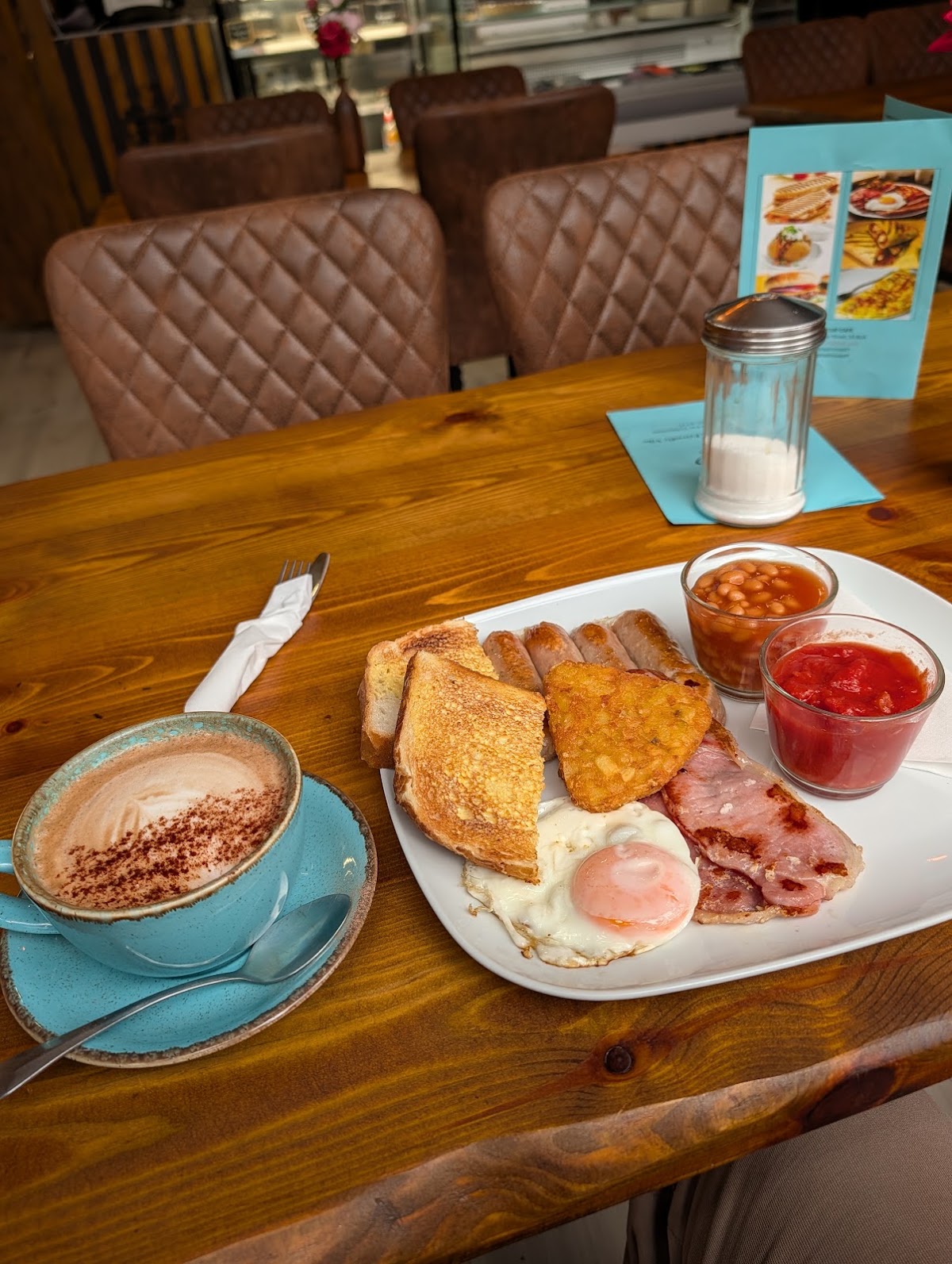
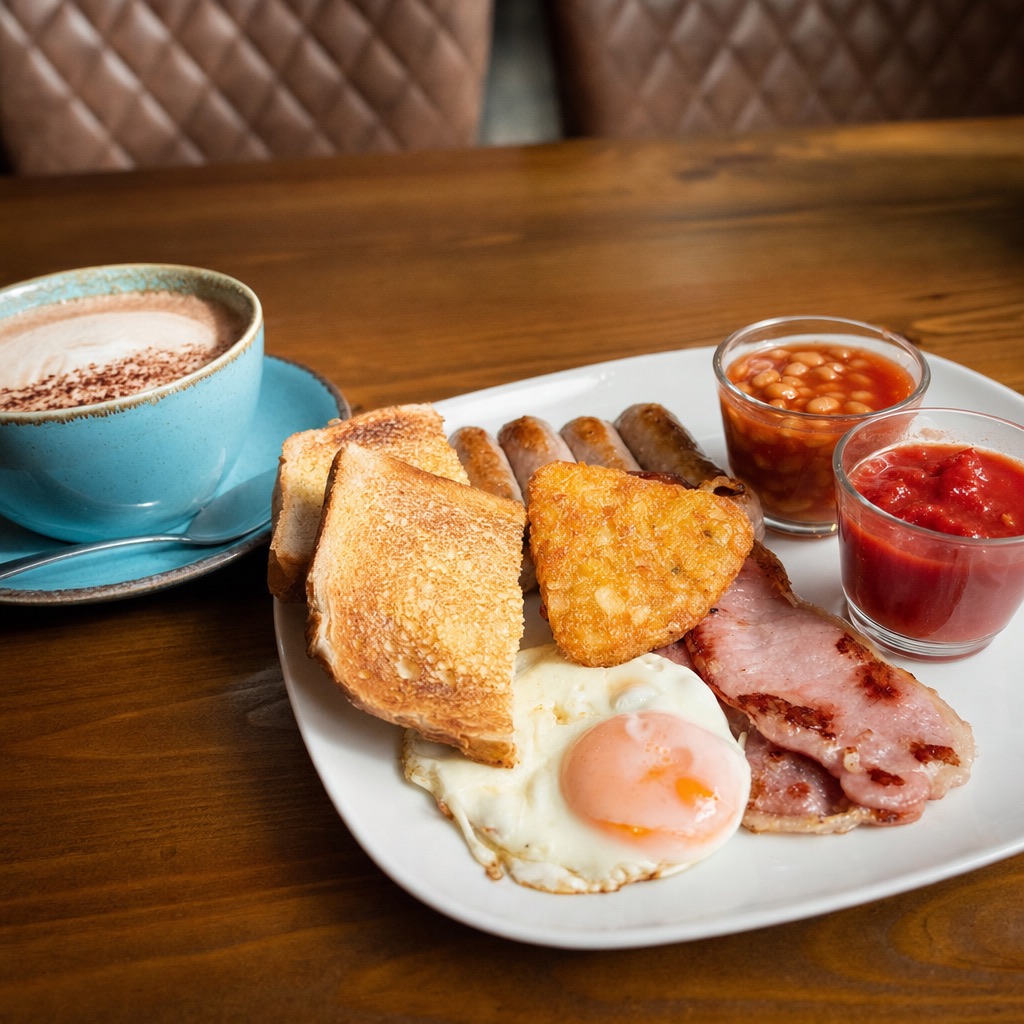
Take the phone snap a customer left on their Google listing and hand it back as a photograph they can actually run an advert with.
What it does, who pays, and the steps
Who pays you. The owner, directly. An independent with one site, where the person who answers the phone is the person who decides. Avoid anything with a head office.
Why it lands. A cafe owner has looked at their own Google photos and winced. They know the breakfast looks grey. They have simply never had the ten minutes or the equipment, and they assume fixing it means hiring a photographer for a day. You are showing them it takes one photo they already own.
What they do instead. Nothing, usually. Or they pay a social media manager a monthly retainer to repost the same grey photos with more hashtags.
The steps that differ
2 Qualify · Rating 4.5+, under 150 reviews, and at least one photo on the listing that is clearly food.
3 Capture · Pull their existing photo straight from Places. You need the photo name from the details call, then one more call for the image itself.
# the photo name comes back in the photos[] array.# you cannot cache it and it expires, so fetch it fresh.curl -L -o before.jpg "https://places.googleapis.com/v1/\places/PLACE_ID/photos/PHOTO_RESOURCE/media\?maxWidthPx=1200&key=YOUR_KEY"
5 Rebuild · Relight and reframe, never restyle. The prompt is in section 8 and the rule it enforces is the one on page 1: the food on the plate may not change.
Why the bad one loses you the client
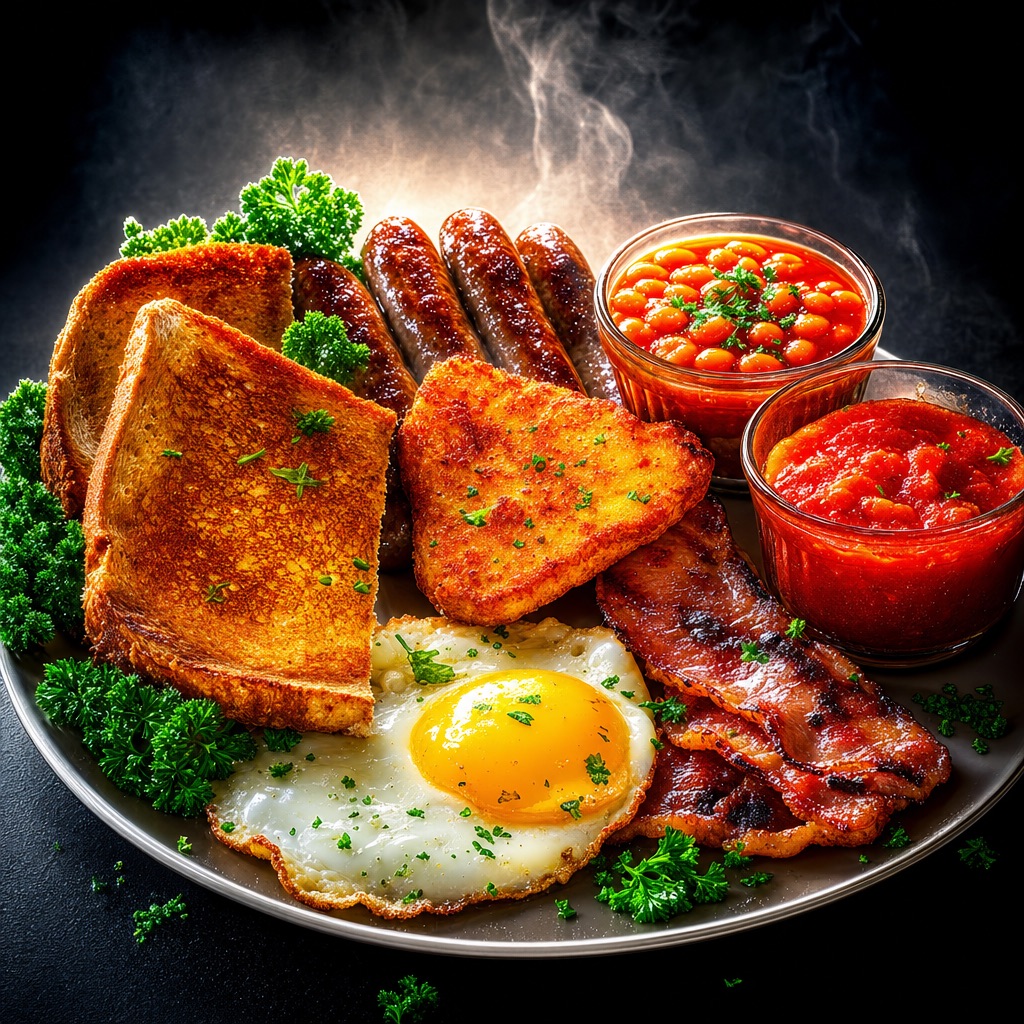
It is not that it looks fake, though it does. It is that a customer will order the breakfast, get the real one, and feel lied to. The owner then wears a one star review that you caused.
The test: could the kitchen actually plate this, today, exactly as shown? If not, you have gone too far. Relight all you like. Never add food.
System 2.2Review gap detector and tap card
Find the cafes whose rating is excellent and whose review count is tiny, then hand them the physical thing that fixes it.
This is the best system in the guide and the one to build first. It needs no image model at all, the qualifier is a single number, and what you sell is a physical object rather than a service, which makes it far easier to charge for.
The problem, precisely. Enclave has 5.0 stars from 14 reviews. Tamper Coffee down the road has 4.6 from 1,972. On a phone, Tamper wins every time, because 14 reviews reads as unproven no matter how perfect the score. The food is not the issue. The count is.
Why it stays broken. Asking for reviews is awkward and the moment of maximum goodwill, just after someone has enjoyed the food, is exactly when the owner is busiest. The ask never happens.
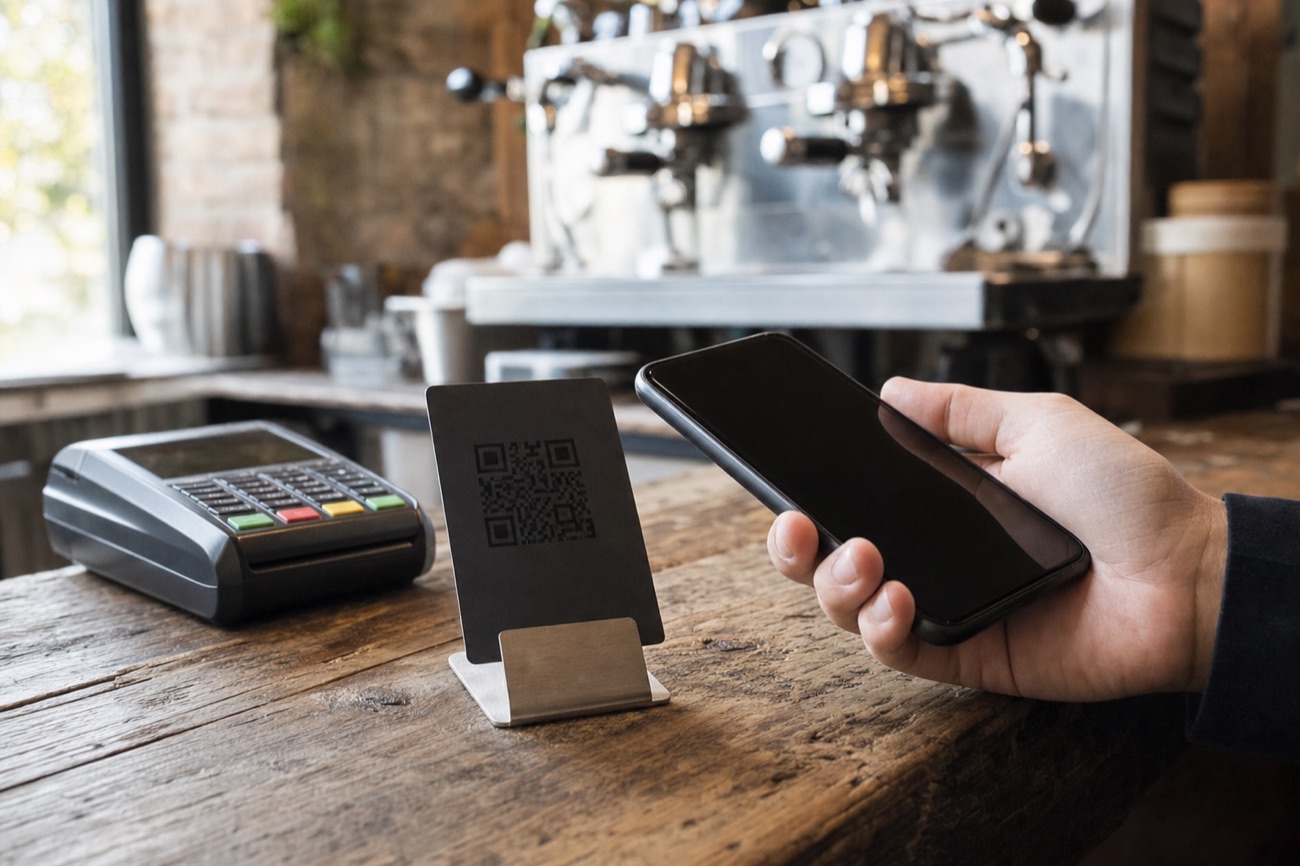
What you sell. A small NFC card that sits on the counter. The customer taps their phone against it and their review page opens, no app and no typing. iPhone XS and newer, and any Android with NFC on, open it automatically on a tap. Every card also carries a printed QR code so older phones still work.
How to set one up. Get the cafe's Google place id from the search you already ran, build their review link as https://search.google.com/local/writereview?placeid=PLACE_ID, and write that URL onto a blank NTAG213 card with any free NFC writer app on your phone. That is the entire technical job. It takes about two minutes per card.
The pitch writes itself, because the numbers are public
You are not guessing. You can tell the owner their exact rating, their exact review count, and the exact count of the competitor two streets away who is beating them. All three are on a public listing, and none of them are your opinion.
The line you must not cross
The card opens the review page. That is all it does. It must not filter people by how happy they are, it must not send unhappy customers somewhere private instead, and it must never offer anything in exchange for a review. Review gating breaks Google's policy and can get the listing penalised, which would make you the person who cost them their listing. Sell the tap, not the outcome.
System 2.3 · 2.4Photo set rebuild, and menu rebuild
The other two things on a Google listing that everybody sees and nobody has ever deliberately made.
2.3The photo set rebuild
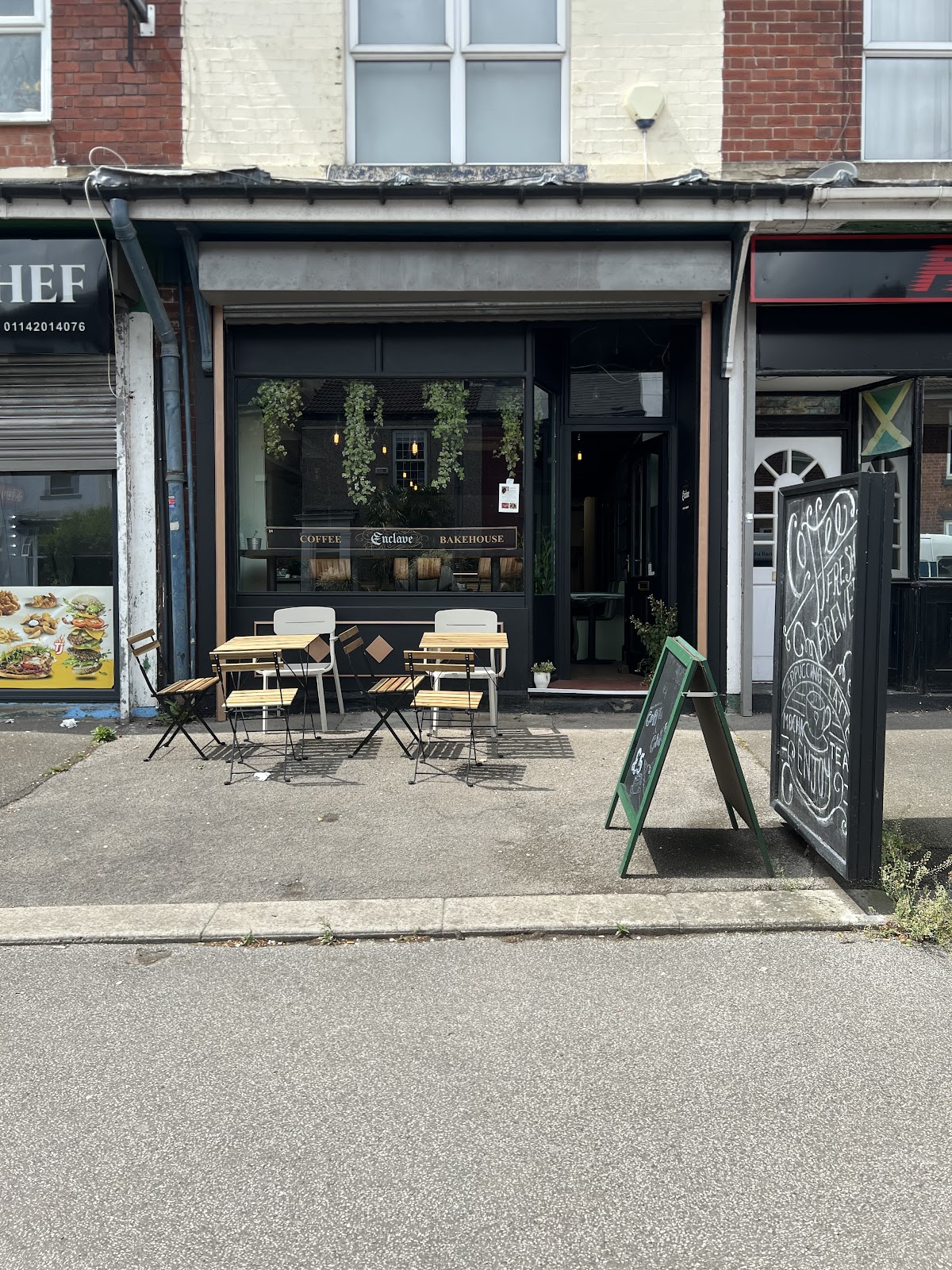
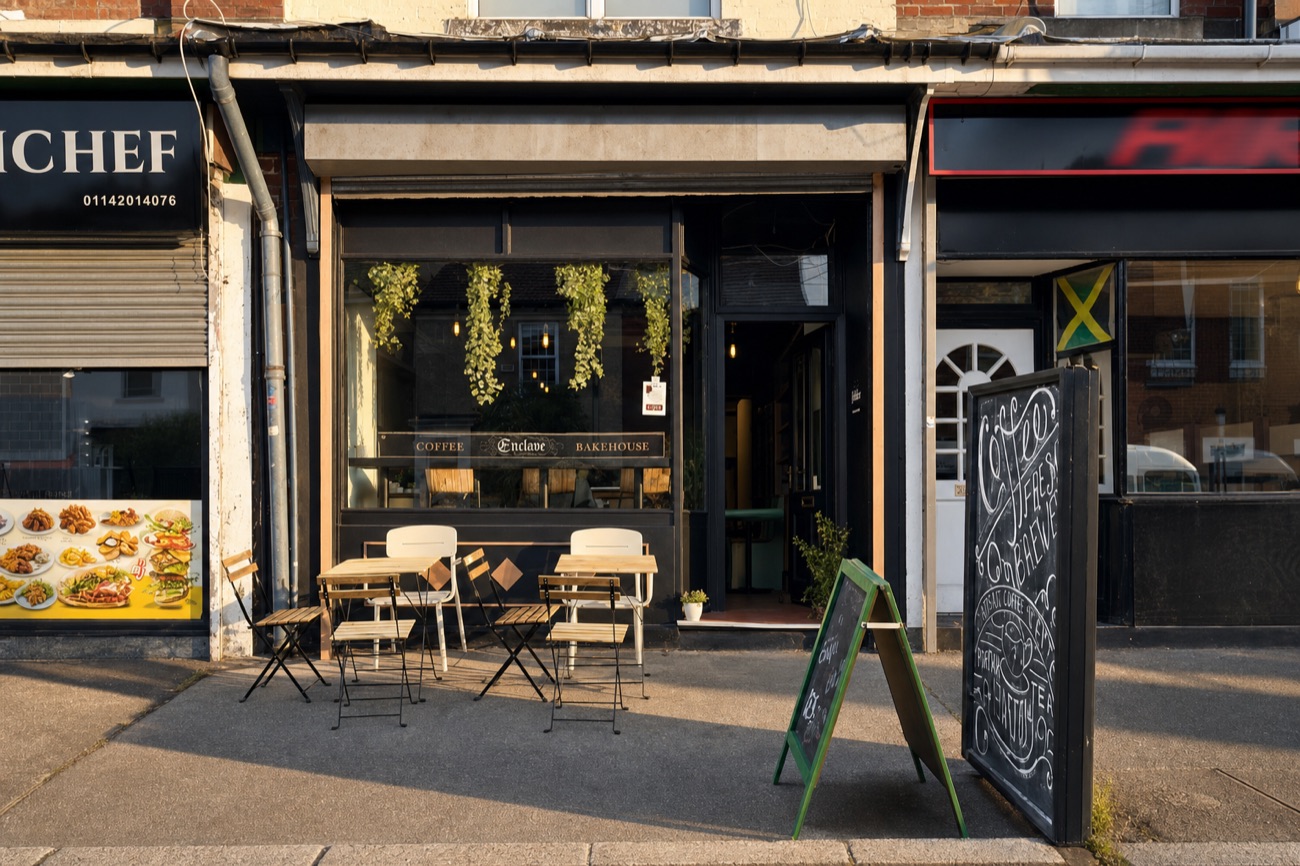
A listing with five photos, all taken by customers, all in flat afternoon light, is doing the cafe active harm. The fix is not new photography. It is relighting and reframing what is already there, then handing back a set of four that belong together.
Qualify on fewer than ten photos on the listing. That number comes free in the search you already ran.
The four shots a cafe listing needs, in this order, because this is the order people swipe: the front of the shop so they can find it, the room so they know what they are walking into, the counter or the cake case so they know what is on offer, and one dish. You can usually build all four from photos the listing already has.
The same rule applies. Relight, straighten, crop, clean up litter. Do not remove the neighbouring shop, do not invent outdoor seating, do not change the signage. It has to be the same shop on the same street or the customer will not recognise it when they arrive.
2.4The menu rebuild
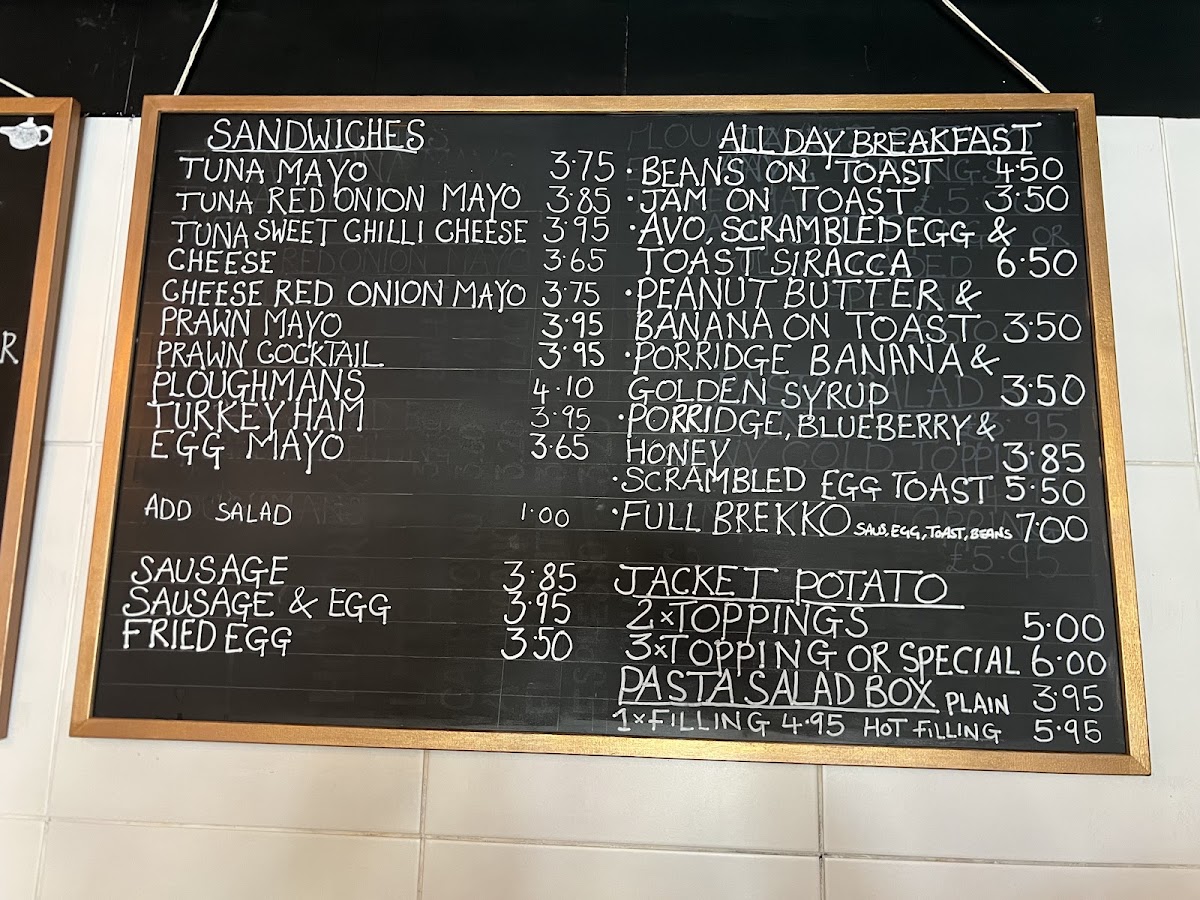
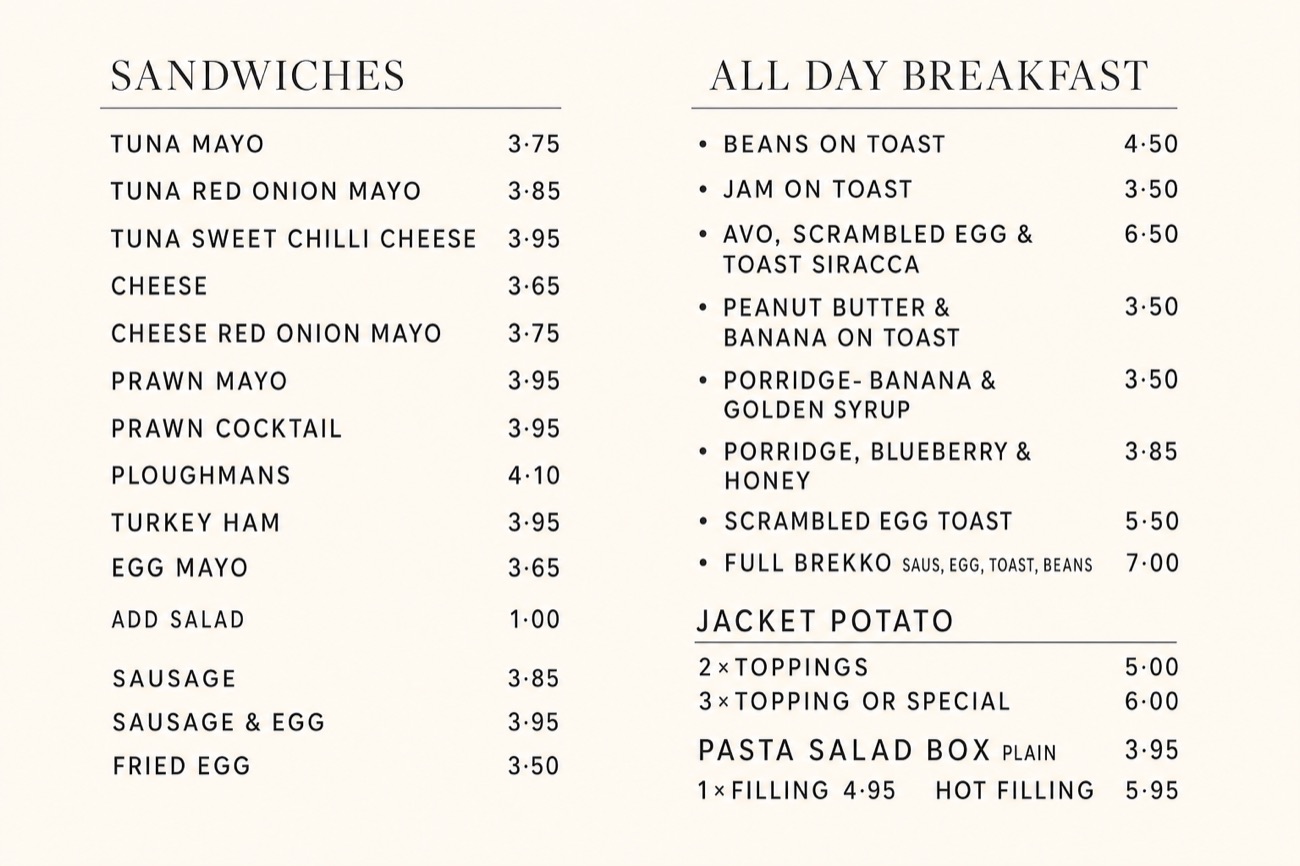
A huge number of independents have no readable menu anywhere online. The menu exists as a chalkboard on the wall, and the only version on the internet is a customer's photo of that board taken at an angle.
This matters more than it sounds. People decide whether to come before they arrive, and a menu they cannot read is a decision they make somewhere else. It is also the single easiest thing to fix, because the content already exists and you are only setting it.
Qualify on no website, or a website with no menu page, or a menu that is only an image. All three are visible from the search you already ran.
Read this before you send a menu
Image models transcribe handwriting imperfectly. A price will change. An item will be dropped. A word will be invented. This is not a small risk, it is the normal outcome, and a wrong price on a menu is a real problem in a real shop.
So the rebuild is a draft, always. Read every line against the original photo yourself before it goes anywhere near the owner, and say plainly in the message that they must check it. I would rather you sent it with a line saying "check my transcription" than sent it looking finished.
Which of the four to build first, if you only build one
2.2, the review gap. No image model, no subscription, a qualifier that is one number, and a physical object at the end that an owner understands instantly. 2.1, dish to ad, is the best demo and the one most likely to get a reply, so build it second and use it as the thing you attach. 2.3 and 2.4 are what you sell after they have said yes once, which is a much easier conversation than the first one.
The prompts
Five prompts, complete, nothing to fill in except the {{double braces}}. The relight prompts are long because almost all of their work is telling the model what it is not allowed to change. That restraint is the entire product.
Step 2Pick the cafes worth working on
Any cheap text model. Paste the Places result in at the bottom.
You are screening cafes and restaurants for a service that rebuilds the pictures on their Google listing. You will be given one place record from the Google Places API. Decide whether this business is worth building something for.Apply these rules in order and stop at the first one that fails:1. REJECT if rating is below 4.5. Reason: "the food is the problem, and i cannot fix that".2. REJECT if userRatingCount is above {{MAX_REVIEWS}} (start at 150). Reason: "already established, they do not need me".3. REJECT if userRatingCount is below 5. Reason: "too new or too quiet to tell whether it is any good".4. REJECT if the name contains any sign of a chain: Ltd followed by a number, a branch name in brackets, or a word that also appears in a national brand. When unsure, keep it and flag it. Reason: "chain, there is a head office and no reachable decision maker".If nothing rejects it, ACCEPT, and then work out which of the four systems this business needs most. Set each flag independently, because a business can need several:- needs_dish_work: true if any photo on the listing is food.- needs_review_push: true if userRatingCount is under 150. This is almost always true and it is the easiest thing to sell, so say so.- needs_photo_set: true if the photos array has fewer than 10 entries.- needs_menu: true if websiteUri is missing entirely.Then pick ONE to lead with, in this priority order, and put it in lead_with:review_push first, then dish, then photo_set, then menu. Lead with the review gap because it is the cheapest thing for them to say yes to.Return ONLY this JSON object and nothing else. No explanation, no code fences.{ "decision": "accept" | "reject", "reason": "one short lowercase sentence", "rating": number, "review_count": number, "photo_count": number, "needs_dish_work": boolean, "needs_review_push": boolean, "needs_photo_set": boolean, "needs_menu": boolean, "lead_with": "review_push" | "dish" | "photo_set" | "menu", "one_line_for_the_owner": "one plain sentence, lowercase, stating the single most useful fact about their listing. no adjectives, no flattery, no pitch."}Never invent a number. Every figure must come from the record you were given.Here is the place:{{PLACE_JSON}}
Step 5Relight one dish
gemini-3-pro-image or gpt-image-2. Send their real photo with it.
Relight and reshoot this real photograph of {{DISH_NAME}} so it looks like it was taken by a food photographer, while keeping it recognisably the same plate of the same food.Keep every item on the plate exactly as it is and in the same arrangement. Do not add, remove, restyle or rearrange any food. Do not change the crockery, the cutlery or the table. Do not add garnish, herbs, sauce, steam, or props of any kind. If something looks slightly untidy on the plate, leave it untidy.What you may change is only this: the light, the camera position and the crop.Move to a soft directional light coming from one side with a gentle falloff, so the food has shape and the shadows are soft rather than the flat overhead glare in the original. Bring the camera lower and closer so the plate fills more of the frame. Let the background fall softly out of focus. Straighten the horizon. Keep the colours natural and true to the actual food, and do not increase saturation.The result must look like an honest photograph of this exact dish on a better day, taken by someone who knew what they were doing. It must not look like a stock image or an advert.No text, no logos, no borders, no watermarks.
Step 5Relight the shopfront or the room
Same models, their real photo
Relight and reshoot this real photograph of {{PLACE_NAME}}, a small independent cafe at {{ADDRESS}}, so it looks like it was taken by a professional, while keeping it unmistakably the same place.Keep the building, the shopfront, the signage, the windows, the door, the furniture, the fittings and the neighbouring shops exactly where they are and exactly as they look. Do not restyle the place, do not change or clean up the sign, do not add plants, furniture, people or lighting that are not already in the photograph, and do not remove the neighbouring buildings.What you may change is only this: the light, the framing and the tidiness of the ground.Move it to warm late afternoon light coming along the street, so the front catches the sun and there are long soft shadows, instead of flat overcast grey. Straighten the verticals and level the horizon. Crop tighter so the building fills the frame and empty road or empty ceiling is reduced. Lift the shadows so any dark signage reads clearly. Remove litter from the pavement.Keep it photographic and honest, like a good local press photograph. Someone who has been to this place must recognise it instantly.No text changes, no added logos, no watermarks.
Step 5Rebuild the menu
Send the photo of their board or their menu
Read the menu in this photograph and set the SAME menu as a clean, modern, printed menu page on a warm off-white background, photographed flat from directly above with soft even light.Transcribe every single item and every single price exactly as they appear. Do not invent items, do not drop items, do not round or alter any price, do not reword anything, and do not correct spelling or capitalisation. If a word is genuinely unreadable in the photograph, write it as XXXX rather than guessing, so that a human can find it and fix it.Keep the same sections in the same order with the same headings, and keep each item under the heading it appears under in the original.Set the section headings in a clean contemporary serif and the items in a simple sans serif, with generous line spacing and prices right aligned in a neat column. Plenty of white space, and a narrow rule under each section heading. No decoration, no icons, no photographs, no logo, no border.It should look like a well made independent cafe menu: calm, readable and plain. Nothing else in the frame.
The XXXX instruction is the important line
Without it the model fills gaps with something plausible, and a plausible wrong price is far more dangerous than an obvious blank. With it, the errors announce themselves and you can fix them in thirty seconds. Keep that line in even when the handwriting looks clear.
And proofread anyway
Read the rebuilt menu against the original photograph line by line, out loud if you have to, before it leaves your machine. This is thirty seconds of work that prevents the one mistake in this guide that could actually cost a business money.
Step 8Write the message
Any text model
Write the message that goes with a rebuilt picture being sent to the owner of a specific cafe. The picture does the selling. Your job is the few lines around it.Facts you may use, and you may not use anything else:- cafe name: {{PLACE_NAME}}- what you rebuilt: {{WHAT}}- their rating: {{RATING}} from {{REVIEW_COUNT}} reviews- number of photos on their listing: {{PHOTO_COUNT}}- the channel: {{CHANNEL}}, either instagram dm or emailRules:- Under 55 words.- All lowercase is fine and preferred. Everyday words, the way one person messages another.- No em dashes. Use full stops and commas.- Open by saying what the attached picture is and that it is their own photo. Do not open with a greeting formula, a compliment about the food, or "I came across your page".- State one real number about their listing, once. Never more than one.- Say plainly that it is free and that they can use it whether or not they reply. Mean it.- Do not offer a call, a meeting, a strategy session, an audit, or a package.- End with one easy question that can be answered in one word.- Never use: unlock, elevate, transform, boost, level up, game changer, passionate, curated, hidden gem, I hope this finds you well, quick question, just following up.- Do not claim you have eaten there, do not claim to be local unless you are, and do not imply you already know them.Return only the message text.
What that gives you for Enclave, on Instagram:
this is your own breakfast photo off your google listing, relit. same plate, nothing added. you are on 5.0 from 14 reviews, which is the only thing holding the listing back. yours to use either way. want the other three?When you outgrow the spreadsheet
For this guide you can go a very long way on a spreadsheet, because the qualifier is one number and you are only ever working on a handful of cafes in one town at a time. Build the app when you have a client paying monthly, and not before.
Three screens. /prospects is the list sorted by review count ascending, so the biggest gaps are at the top. /prospects/[id] puts their original photo and your rebuild side by side with the message in an editable box. /sends is one row per send, never overwritten.
Three tables. Places is one row per cafe with its rating, review count and photo count. Assets is the before, the after and the message, with a status that starts at pending. Sends is one row every time something goes out. You do not have to write the SQL yourself.
Set up the database
Paste into Claude Code, Cursor, or any AI coding tool, in your project folder
Set up Supabase for this project using the Supabase CLI, and write the SQL migration for me.First, if it is not already set up: install the CLI, run `supabase init`, then `supabase link` to my project, and tell me exactly what to paste when it asks for my project ref and database password.Then create a migration with three tables. Use uuid primary keys with gen_random_uuid() as the default, and give every table a created_at that defaults to now().TABLE 1, places. One row per cafe or restaurant I am considering. - owner_id, text, not null. This is my Clerk user id. - place_id, text, unique, not null. The Google Places id. - name, text, not null. address, text, not null. - website, text, nullable. Null means they have no site, which is a qualifier in itself. - rating, numeric. review_count, int. photo_count, int. - needs_dish_work, needs_review_push, needs_photo_set, needs_menu, all boolean. - lead_with, text. One of 'review_push', 'dish', 'photo_set', 'menu'. - raw, jsonb. The entire Places response, kept as is. - status, text, not null, default 'new'.TABLE 2, assets. One row per thing I rebuild for a place. - place_id_fk, references places, and delete it if the place is deleted. - kind, text. One of 'dish', 'storefront', 'room', 'menu', 'tapcard'. - before_url and after_url, text. Where the two pictures live in storage. - body, text. The message that goes with it. - model, text, and prompt, text. Which image model made it and the exact prompt used. - proofread, boolean, not null, default false. For menus this must be true before it can be approved, because menu transcription errors are the one mistake that costs a real business money. - status, text, not null, default 'pending'. Only 'pending', 'approved' or 'rejected'.TABLE 3, sends. One row every single time something goes out. Never updated, only inserted. - asset_id, references assets, and delete it if the asset is deleted. - channel, text. One of 'instagram', 'email', 'walk_in'. - to_handle, text, not null. status, text, not null, default 'queued'. - sent_at, timestamptz, nullable.Now the security. Turn on row level security on all three tables, then write policies so I can only ever see and change my own rows. places has owner_id on it directly, so compare that against the Clerk user id, which Supabase exposes as auth.jwt() ->> 'sub'. assets and sends have no owner column of their own, so their policies have to join back up to places to work out who the row belongs to.Add one more thing: a check constraint or a trigger so that an asset of kind 'menu' cannot be set to status 'approved' while proofread is still false. I want the database to stop me sending an unchecked menu, not my own memory.Also create a private storage bucket called 'assets' for the pictures, with a policy that only lets me read files inside a folder named after my own user id.Finally, add the indexes that matter: I will be listing places by owner and status, sorting them by review_count ascending, and looking up assets that are still pending.Explain in plain English what each policy does before you write it, run the migration with `supabase db push`, then show me one test query proving a second user cannot read my rows.
Charging, going live, and the rest of the world
How to charge, and this industry is different
Cafes have thin margins and are pitched to constantly, so a monthly retainer is a hard sell and a fast churn. Sell things, not services.
The tap card is a product. One price, they own it, no monthly. It is the easiest yes in this guide and it gets you in the door as someone who delivered a physical object that worked.
The photo set is a job. A fixed price for a set of four, done once. Offer the first one free, always, because that is what makes the message land at all.
The menu is a job with a warning attached. Price it as a rebuild, hand it over as an editable file as well as a picture, and make them sign off the transcription.
The monthly, if you ever get one, is a fresh dish photo every week for their social. That is worth paying for continuously because it runs out. Photo sets and menus do not.
Run it yourself, always
Handing this over does not work. Someone has to look at every rebuild and decide whether the food still looks like the food, and a cafe owner will not do that about their own dish. Keep the system, sell the output.
Before you send the first one
- The Google key is restricted to the Places API only, with a budget alert on the project
- You have rebuilt at least ten dishes and looked at every one, so you know when relighting has tipped into restyling
- Every menu you have made has been proofread line by line against the original photo
- Your Instagram account looks like a person, not a service. A blank account with a logo gets ignored
- You can name the cafe getting the first one, and say what its exact review count is
What breaks
The photo name expires. Google says plainly that you cannot cache a photo name and that it can stop working. Fetch it fresh from a details call every time, or your pipeline will start failing on prospects that were fine last week.
The model restyles instead of relighting. It will add a garnish, tidy a plate, or swap a chipped mug. This is the failure that matters and you catch it by holding the two images side by side, not by reading the prompt again.
Nobody answers email. In food, Instagram DM beats email by a wide margin, and walking in at 3pm on a Tuesday with a printed photo beats both. This is one of the few industries where the offline version of the send is genuinely the strongest.
What I have not tested
The Places search, the photo pull and every rebuild in here were run against the live API on the real cafes named. I have not sent any of it to those businesses, programmed a physical tap card, or measured a reply rate. Enclave, CAWA and The First Sip are real businesses used as public examples and have no idea this guide exists.
Country notes
This guide degrades less than any other in the series, because Google Places covers restaurants almost everywhere on earth and a photo is a photo in every language.
What changes is the channel and the platform. In most of Latin America, India, Indonesia, Nigeria and Kenya, WhatsApp is how a cafe is reached, and a business number on the listing is normal. In Japan and Korea, use email and expect a slow, formal reply. Across East and Southeast Asia the review platform that matters may not be Google at all, so check which listing the locals actually use before you build a qualifier on review counts.
The one legal line worth knowing, everywhere
You may relight a photograph that a customer took and posted to a public listing, and hand it to the business it depicts, as a demonstration. You should not republish it yourself, sell it to anyone else, or strip the attribution and claim it. The safe version, and the one I would stick to, is: rebuild it, give it to the owner, tell them where it came from, and let them decide what to do with it. That also happens to be the version that makes them like you.